
Rich Text
🚀 Present formatted text and media for enhanced information delivery.
The Rich Text widget displays a rich text field from a specific entry as defined in the configuration. This helps our users to display their desired rich text field on the dashboard.
Configuration Example
Here is an example configuration:
{
   "type": "rich-text",
   "config": {
      "title": "Sample Item",
      "record": "backlog-items",
      "field": "Train hard and find your rhythm on the road. The added flex feels highly responsive and secure with every step. You've got goals to hit, lace up and fly towards a new best.",
      "entryId": 251334
    }
}
From the example, we learn that:
type: Specifies the widget type as a Rich Text widget.config: Contains the configuration settings for the widget.title: Sets the title of the widget.record": Specifies the type of record.field: Specifies the specific field within the record that contains the rich text content.entryId: Identifies the unique ID of the entry from which the rich text content will be fetched.
Combining Layout Widget and Layout Section
Here’s an example of a full dashboard layout that includes a Rich Text widget.
Layout widgets
[
    {"widgetId":"77785"},
    {"widgetId":"32068"}
]
[
{
"title": "1st section",
"widgetArray": [
{
"type": "rich-text",
"config": {
"title": "Sample Item",
"record": "backlog-items",
"field": "Train hard and find your rhythm on the road. The added flex feels highly responsive and secure with every step. You've got goals to hit, lace up and fly towards a new best.",
"entryId": 251334
}
},
"77785",
"32068"
],
"xs": [6, 6, 6],
"md": [6, 6, 6],
"lg": [4, 4, 4]
}
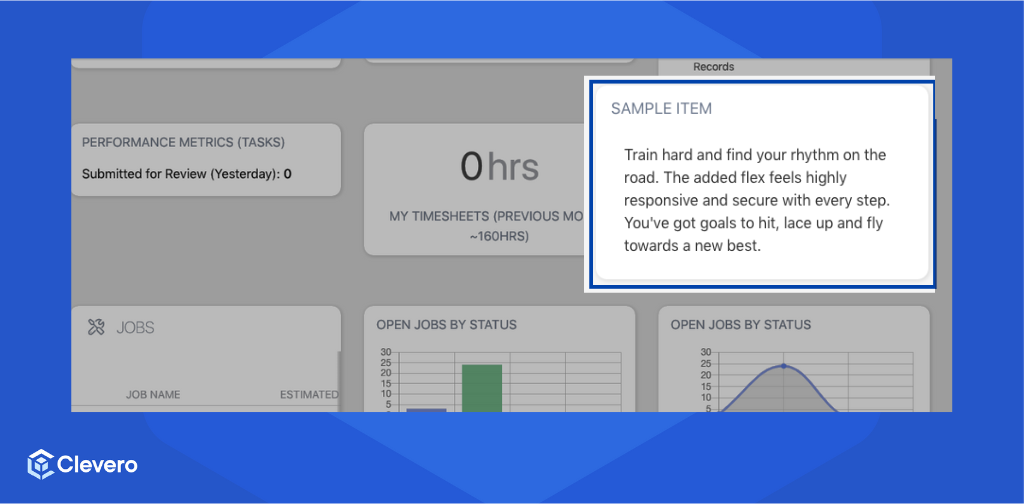
]The example configuration above is shown as follows:
📌 Need Help?

Updated about 1 year ago
Did this page help you?