
Weekdays and Weekends in Date Calculations (WD/WE)
Count only weekdays or only weekend days between two dates using the DATEDIF formula.
1. Overview
Formula fields in Clevero can calculate the difference between two dates using the DATEDIF function. Besides years, months and days, DATEDIF has two units for working-day calculations:
- "WD" counts weekdays (Monday to Friday) between two dates.
- "WE" counts weekend days (Saturday and Sunday) between two dates.
Use these units on any record with two date fields when calendar days alone would be misleading.
2. Common Uses
The WD unit can be used to calculate:
- Working days in a project, task or contract period
- Business days between a request date and a completion date
- Weekdays within a leave, booking or absence period
The WE unit can be used to calculate:
- Weekend days within an event, roster or rental period
- Weekend days worked or booked within a date range
- Weekend days to exclude or charge separately in a period
3. Creating a WD or WE Formula Field
Watch the guided demo below to create a new field.
You can also follow the same steps using the written guide below.
Before you start, make sure the record has two date fields, for example a start date and an end date.
-
Go to Settings > System Settings > Records.
-
Select the required record.
-
Select Fields, then click Add Field.
-
Enter a Field Name (for example,
WeekdaysorWeekend Days). -
In Data Type, select Formula.
-
Under Write Formula, click + Formula, search for DATEDIF under Date & Time, and select it.
-
With the cursor inside the brackets, click + Variable and select the start date field.
-
Type a comma, click + Variable again and select the end date field.
-
Type a comma followed by the unit:
"WD"for weekdays or"WE"for weekend days. -
Click Save.
Your formulas will look similar to these, with your own field IDs in place of the placeholders.
Weekdays (WD):
DATEDIF({{[start-date-field-id]}}, {{[end-date-field-id]}}, "WD")
Weekend days (WE):
DATEDIF({{[start-date-field-id]}}, {{[end-date-field-id]}}, "WE")
📘 Note: Create a separate formula field for each unit, for example one field with "WD" and another with "WE". Always insert date fields with + Variable rather than typing them, so the correct internal field IDs are used.
4. Configuration
DATEDIF uses the following syntax:
DATEDIF(start_date, end_date, unit)
| Parameter | Type | Requirement | Description |
|---|---|---|---|
| start_date | Date | Mandatory | The first date in the range. |
| end_date | Date | Mandatory | The last date in the range. |
| unit | Text | Mandatory | The unit to calculate, entered in double quotes. |
4.1. Available Units
| Unit | Returns |
|---|---|
| "Y" | Years between the two dates |
| "M" | Months between the two dates |
| "D" | Days between the two dates |
| "WD" | Weekdays (Monday to Friday) between the two dates |
| "WE" | Weekend days (Saturday and Sunday) between the two dates |
📘 Note: Create three formula fields using "D", "WD" and "WE" to show the total, weekday and weekend counts side by side.
5. Example
A record has a start date of Tuesday 1 December 2026 and an end date of Monday 1 February 2027.
| Formula | Result |
|---|---|
DATEDIF(start_date, end_date, "D") | 62 total days |
DATEDIF(start_date, end_date, "WD") | 44 weekdays |
DATEDIF(start_date, end_date, "WE") | 18 weekend days |
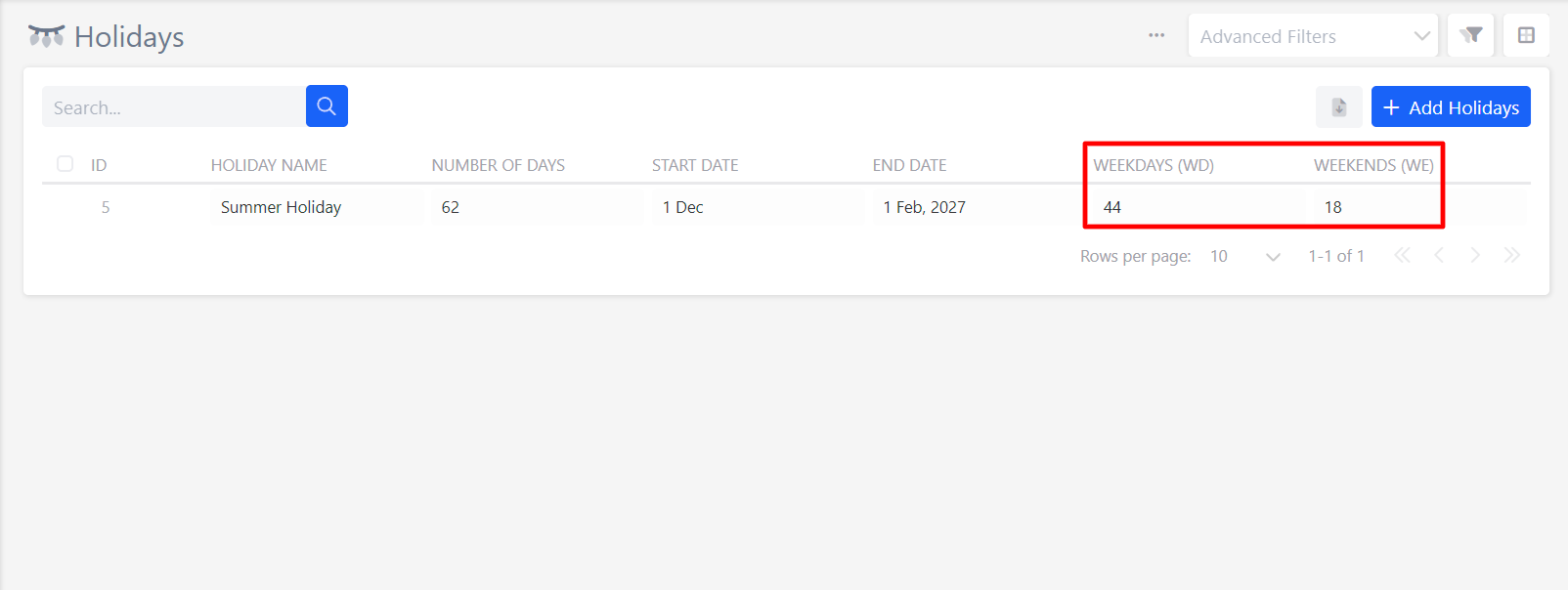
Weekdays and weekend days always add up to the total number of days: 44 + 18 = 62.
6. Notes
- Start date counted, end date not: the start date is included and the end date is not. This applies to
"D","WD"and"WE". In the example above, Monday 1 February is not counted. - Fixed weekend: Saturday and Sunday are counted by
"WE". Monday to Friday are counted by"WD". - Holidays counted as weekdays: public or organisation holidays that fall on a weekday are still counted by
"WD", not"WE". - Showing the results: to display them on a record, add the formula fields to the record's entry layout like any other field.
📌 Need Help?
If you require assistance or encounter any issues, please don't hesitate to contact us for further support.
Updated about 3 hours ago