
Audit Trail
🔄 Trace Every Step: Audit Trail for Complete Data Transparency.
The Audit Trail ensures transparency, providing valuable insights into user actions and system events. This guide will help you understand the importance of the Audit Trail and how to utilise it.
1. Benefits
The Audit Trail feature is important to maintain data integrity within our system. It provides the following benefits:
- Monitor user actions and identify who performed specific actions within the system.
- Identify any suspicious or unauthorised activities within the system.
- Enable real-time Audit Trail entry tracking to identify and promptly respond to critical events.
2. Creating the Audit Trail
The Audit Trail can be created using the Entry Layouts menu, whether creating a new Entry Layouts or modifying an existing one.
Watch the guided demo below to set up the Audit Trail.
You can also follow the same steps using the written guide below.
- Go to "Settings" > "System Settings".
- Open the Entry Layouts menu.
- Choose the layout that you want to configure.
In the next step, we already have the container in place. The container will organising different sections within the Entry Layouts.
To create a new container from scratch, refer to the Entry Layout Builder page.
- Start by adding a "Tabs Tile" to the Container.
- Click on the "Inspect" tab to access the configuration options for the Tabs.
- In the
titlefield, input "Audit Trail". This will be displayed as the title of the Audit Trail tab. - Once the title is set, add an Audit Trail inside the Tabs.
- Click on the "Save Changes" button.
Accessing the Audit Trail
To access the Audit Trail, follow these steps:
- Open the side menu by clicking on the menu in the sidebar.
- Choose the desired record's entry from the available options.
- By default, the Audit Trail is minimised instead of automatically expanded. Click on it to expand and reveal the details.
- The Audit Trail details will now be fully expanded, allowing you to view the complete information and history associated with the record.
Audit Trail Entries
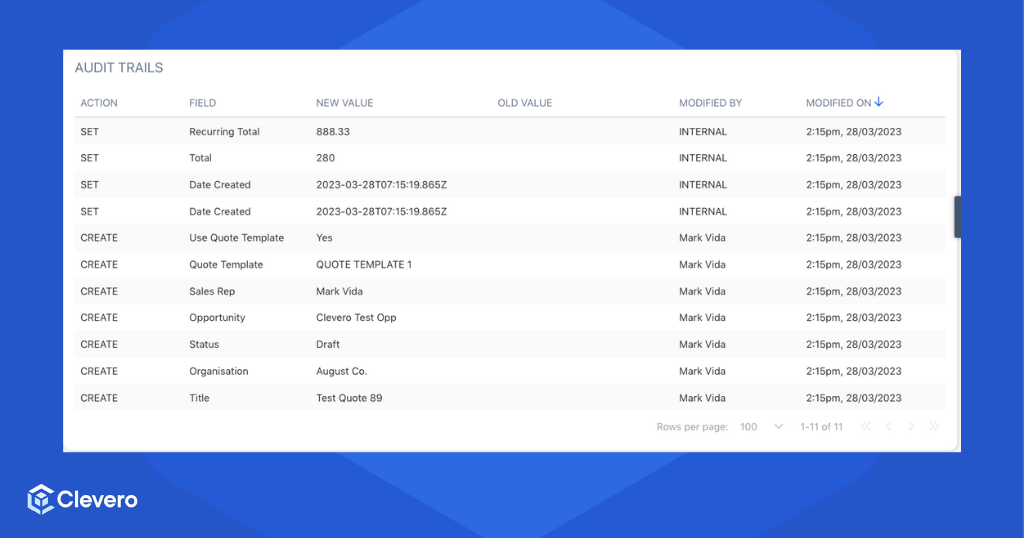
Each Audit Trail entry contains the following information:
| Entries | Description |
|---|---|
| Action | The specific action or event within the system. Such as SET, CREATE, and UPDATE. |
| Field | The particular attribute or data field impacted by the action. It helps pinpoint the specific area where changes were made. |
| Modified By | The user responsible for initiating and executing the action. |
| Modified On | The timestamp when the action occurred. |
| New Value | The updated or modified value associated with the field after the action was executed. |
| Old Value | The field's original value before any modifications were made. |
NoteChanges made to fields are tracked separately. See Field Audit Trail for details.
📌 Need Help?

Updated 14 days ago