
Email Blasts
The Email Blasts feature lets you easily send scheduled or recurring emails to targeted groups of users. You can choose who receives the email, when it’s sent, and what template it uses, all in one place.
- Go to Settings → System Settings → Email Blasts.
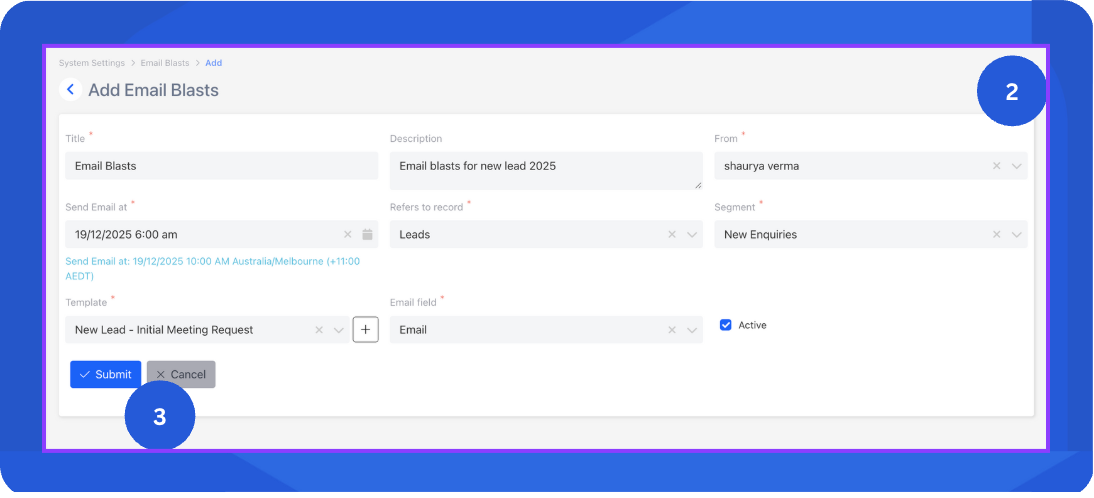
- Create a new blast or update an existing one by filling in the following fields:
- Title: Name of the email blast.
- Description: Short summary of what this blast is for.
- From: Sender name or email address shown to recipients.
- Send Email At: Schedule when the email should be sent.
- Refers to Record: Select the record or module the email blast is associated with.
- Segment: Filter from the records to define your target audience.
- Template: Choose an existing email template. If you haven’t created one yet, learn how here: Email Templates
- Email Field: Select the field from the template that contains the recipient’s email address captured from the record.
- Active: Enable this toggle to activate the email blast.
- Click Submit to save your changes. It will automatically send emails at the scheduled time to all recipients that match your selected segment.
InfoIf the blast is inactive, it will be saved as a draft and won’t send any emails until you enable it.
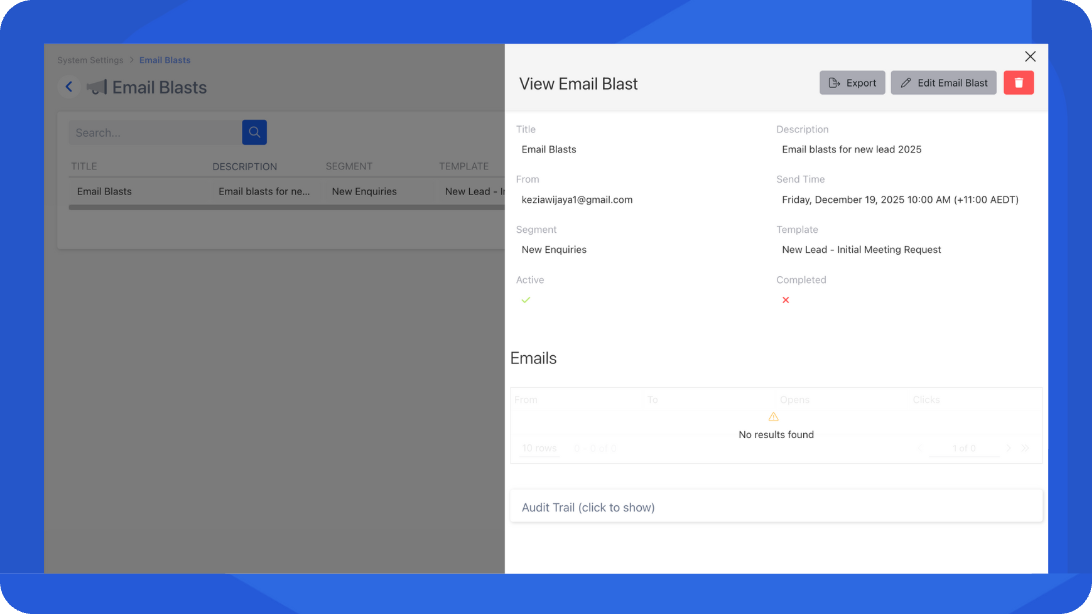
- You can return to this page anytime to edit or monitor the status of your blasts.
📌 Need Help?

Updated 12 months ago
Did this page help you?