
Anatomy of an Entry Layout
✅ Exploring the Anatomy of Entry Layouts.
When designing an entry layout, it's important to consider various elements to produce a seamless user experience.
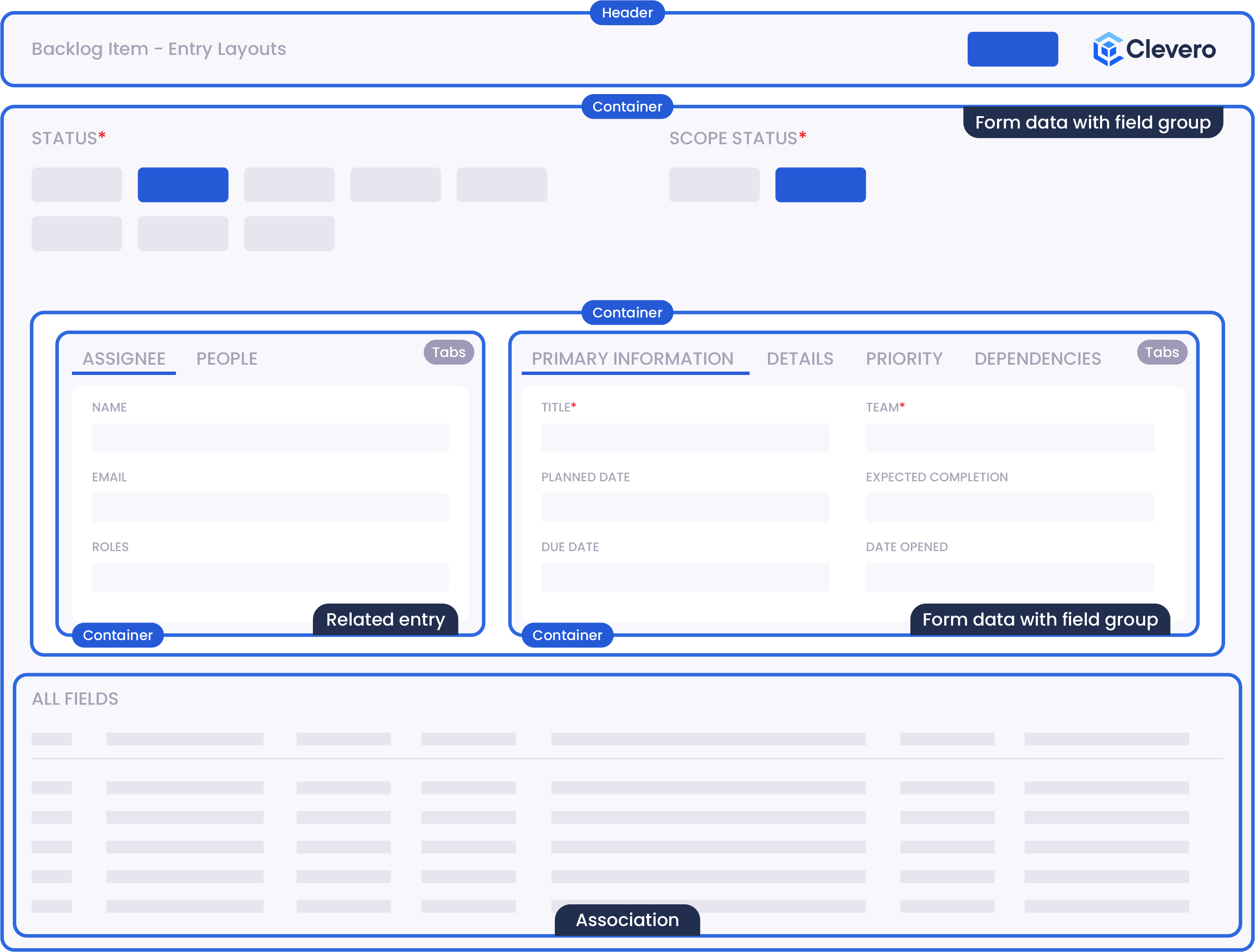
Here's a breakdown of the key components:
| Components | Details |
|---|---|
| Association/Sub-Records | Associations or Sub-Records are additional records or data linked to the main entry. Please see the Record Relationships page for more details. |
| Container/Content Body | The Container or Content Body is the main area where the entry's content is displayed. It can include elements like Tabs, Forms, Fields, etc. |
| Form Data with Field Group | This component includes form elements and fields for capturing and editing data related to the entry. |
| Header | The Header serves as the topmost section of the Entry Layout. It may also incorporate the action button and an option for easy usability. |
| Related Entry | The Related Entry component displays information or links to other entries associated or connected to the current entry. |
| Tabs | Tabs are used to organize and present different sections or aspects of the entry's content. Each tab represents a specific category or subtopic, allowing users to navigate and access different sets of information within the entry. |
Info:For the full reference guide, please click here.
📌 Need Help?

Updated over 1 year ago
Did this page help you?