
🚀 Enhance productivity with Workflow Functions.
We have categorised all our functions into key areas that will assist you in your scripting journey.
- Communication
- Current Event Context
- Files
- Logs
- Payments
- Portals
- Records
- Search Filters
- Xero and Myob
Communication
Communication functions are functions related to communication within the system. These relate to emails, SMS, notifications and other functions that assist/relate to these communication types.
addRelationship
This function creates SMS/email logs as a relationship to entries. Once created this will display in the Communication Log on Entries.
It supports two types: SMS and Email.
This function can be used along with mergeSmsTemplate and sendSms.
| Input Parameters | Returns |
|---|---|
| SMS logs. |
C.addRelationship({
  messageData: {
    to: sendSmsResponse.success[0].to,
    body: sendSmsResponse.success[0].messageSentStatus.body,
    messageId: "messageId"
  },
  type: "sms",
  linkedEntries: [{ recordId: 233450, entryId: 2715083 }],
  options: {
    logMessageToCurrentEntry: true
  }
});
Output
{
  "success": true,
  "data": {
    "messageData": {
      "to": "+628123456789",
      "body": "Your ticket #TK-2026-001 has been successfully created.",
      "messageId": "sms_msg_987654"
    },
    "type": "sms",
    "linkedEntries": [
      {
        "recordId": 233450,
        "entryId": 2715083
      }
    ],
    "options": {
      "logMessageToCurrentEntry": true
    }
  }
}
Use this function for creating email logs.
| Input Parameters | Returns |
|---|---|
| Email logs. |
C.addRelationship({
  messageData: {
    from: emailInput.from,
    to: emailInput.to,
    bcc: emailInput.bcc,
    cc: emailInput.cc,
    attachments: [...(emailInput.attachments || [])],
  },
  type: "email",
  linkedEntries: [{ recordId: 233450, entryId: 2715083 }]
});
Output
{
  "success": true,
  "data": {
    "messageData": {
      "from": {
        "email": "[email protected]",
        "name": "Clevero Support"
      },
      "to": [
        "[email protected]"
      ],
      "bcc": [
        "[email protected]"
      ],
      "cc": [
        "[email protected]"
      ],
      "attachments": [
        {
          "id": "file_10293",
          "fileName": "invoice.pdf",
          "url": "https://cdn.clevero.co/files/invoice.pdf"
        }
      ]
    },
    "type": "email",
    "linkedEntries": [
      {
        "recordId": 233450,
        "entryId": 2715083
      }
    ]
  }
}
mergeEmailTemplate
Merges an email template.
| Input Parameters | Returns |
|---|---|
An object containing various data attributes such as:
| Email template. |
Example
async function script(C) {
    const { entryId, recordId, recordInternalId } = C.getEvent();

    // Email input configuration
    const emailInput = {
        entryId,
        recordInternalId: "leads",
        templateId: 10001340,
    };

    // Merge the email template
    const response = await C.mergeEmailTemplate(emailInput);
    const subject = response.subject;
    const body = response.body.replace(
        "{custom_data}",
        "Hello world! This was changed"
    );

    const sendEmailResponse = await C.sendEmail({
        entryId,
        recordInternalId,
        from: {
            email: "[email protected]",
            name: "test",
        },
        to: ["[email protected]"],
        subject,
        body,
    });

    return C.addJsonToSummary(
        { response, sendEmailResponse },
        { "enableCopy": true }
    );
}
Output
{
  "entryId": 2715083,
  "recordInternalId": "leads",
  "templateId": 10001340,
  "subject": "Welcome to Clevero, John!",
  "body": "<p>Hello John Doe,</p><p>Thank you for joining Clevero.</p><p>Hello world! This was changed</p>",
  "success": true
}
mergeSmsTemplate
Merges an SMS template.
| Input Parameters | Returns |
|---|---|
smsInput object containing various data attributes such as:
| SMS Template. |
Example
async function script(C) {
    const { entryId, recordInternalId, recordId } = C.getEvent();
    const currentEntry = await C.getCurrentEntry();

    // SMS Variables
    let baseUrl = "https://api.tallbob.com/v2/sms/send";
    let from = "639171234567";
    let to = "639171234567";
    let templateId = 10014504;

    // SMS Inputs
    let smsInput = {
        entryId,
        recordInternalId,
        templateId,
    };

    const response = await C.mergeSmsTemplate(smsInput);
    const body = response.body;

    C.addJsonToSummary(response, { "enableCopy": true });

    return;
}
Output
{
  "response": {
    "body": "Hi, this is a test SMS."
  }
}
addRedirect
Redirects the user to the specified URL/path.
| Input Parameters | Returns |
|---|---|
| URL or destination path. | No return value is specified. |
Here are two kinds of redirect functions that you can use:
1️⃣ Redirect in the current tab
C.addRedirect("/app/records/233450/view/1137725"); Output
User will be redirected to the specified link.
2️⃣ Redirect to a page in a new tab
Pass true as the second argument to open the URL in a new tab
C.addRedirect("<https://www.clevero.co/">, true);Output
User will be redirected to the specified link.
3️⃣ Redirect page to a specific filtered view
Use this when you want to redirect users to a record list view with a predefined filter and layout. The URL must include the recordId, savedSearchId, and layoutId.
URL format
https://app.clevero.co/app/records/{recordId}/view?savedSearchId={savedSearchId}&layoutId={layoutId}Example
C.addRedirect(
  "https://app.clevero.co/app/records/464033/view?savedSearchId=10040119&layoutId=558205"
);
Output
User will be redirected to the specified link.
sendEmail
Sends an email from a workflow.
| Input Parameters | Returns |
|---|---|
| string — A response indicating the email was sent. |
*Use either subject and body or templateId in a single request. Avoid using both at the same time.
Example
const response = await C.sendEmail({
    entryId: 12345678,
    recordInternalId: "record-abc123",
    from: {
        email: "[email protected]",
        name: "Example Notifications",
    },
    to: ["[email protected]"],
    subject: "Sample Subject",
    body: "<p>This is a sample email.</p>",
});
InfoSee the
sendEmailrequest and response examples here.
sendNotification
Sends a notification to the user when a certain event occurs within the system.
| Input Parameters | Returns |
|---|---|
| A notification with a message. |
Example
C.sendNotification({
         payload: {
            message: `Version 1.0.0 is out now`,
            metadata: {
                redirectUrl: `/app/records/${currentEntry.recordId}/view/${currentEntry.recordValueId}`,
            },
            topic: "COMMUNICATIONS",
            subTopic: "EMAIL_REPLY",
        },
        audience: "USER",
    })
Output
{
  "success": true,
  "notificationId": "notif_772819",
  "payload": {
    "message": "Version 1.0.0 is out now",
    "metadata": {
      "redirectUrl": "/app/records/233450/view/2715083"
    },
    "topic": "COMMUNICATIONS",
    "subTopic": "EMAIL_REPLY"
  },
  "audience": "USER",
  "status": "queued"
}
sendSms
Sends SMS from the workflow.
| Input Parameters | Returns |
|---|---|
| Message sent status. |
Example
C.sendSms({
        entryId: entry.recordValueId,
        to: ["9860722217", "489921018"],
        // templateId: 2224398,
        body:
            " {{[title]}} due date: {{[due-date]}} status: {{[status].[value]}}",
        recordInternalId: "backlog-items",
    });
Output
{
  "success": [
    {
      "to": "9860722217",
      "messageSentStatus": {
        "status": "sent",
        "body": "Fix homepage bug due date: 2026-05-30 status: In Progress",
        "providerMessageId": "sms_provider_7281"
      }
    },
    {
      "to": "489921018",
      "messageSentStatus": {
        "status": "sent",
        "body": "Fix homepage bug due date: 2026-05-30 status: In Progress",
        "providerMessageId": "sms_provider_7282"
      }
    }
  ],
  "failed": [],
  "entryId": 2715083,
  "recordInternalId": "backlog-items"
}
shortenUrl
Shortens a long URL.
| Input Parameters | Returns |
|---|---|
url: A long URL to shorten. | Shortened URL. |
Example
C.shortenUrl({url});C.addRelationship({
messageData: {
from: emailInput.from,
to: emailInput.to,
bcc: emailInput.bcc,
cc: emailInput.cc,
attachments: [...(emailInput.attachments || [])],
},
type: "email",
linkedEntries: [{ recordId: 233450, entryId: 2715083 }]
});Output
{
  "success": true,
  "originalUrl": "https://www.clevero.co/products/workflow-management/automation-builder",
  "shortUrl": "https://clvr.to/X7ab92"
}
Current Event Context
These functions relate to retrieving information about the current execution of the script. Whether it be the user, their role, informations about the Entry, these functions will assist in getting you the information you need.
getCompanySettings
Gets company settings. This will usually obtain information like company Name, timezone, and address that used inside scripts.
| Input Parameters | Returns |
|---|---|
| - | Company settings. |
Example
let companySettings = C.getCompanySettings();
C.addJsonToSummary(companySettings);
Output
{
  "name": "Clevero",
  "email": "[email protected]",
  "phone": "1300 94 94 68",
  "address": ", , , ",
  "street": "",
  "city": "",
  "region": "",
  "postalCode": "",
  "country": "",
  "abn-acn": "",
  "website": "www.clevero.co",
  "logo": "",

  "timezone": "Asia/Kathmandu",
  "currencyDefault": "AUD",
  "heightDefault": "",
  "weightDefault": "",
  "defaultTemplate": "",
  "catchAllEmail": "",
  "xeroOrganisation": {
    "value": 71639,
    "label": "Clevero",
    "xeroId": ""
  },


  "xeroMultiTenant": false,
  "esignatureHeading": "eSignature",
  "esignatureDisclosureURL": "",
  "privacyPolicyURL": "",
  "extAppMemberRefLabel": "",
  "extAppConfirmationEmailTemplateSession": "",
  "extAppConfirmationEmailTemplateCourse": "",
  "entryInfo": {
    "recordId": 765,
    "entryId": 766
  }
}
getEvent
Retrieves the current event context at the time the script is executed. This includes details such as the event type, the user who triggered it, and other relevant information.
| Input Parameters | Returns |
|---|---|
| - | stateEvent |
Example
async function script(C){
    const eventData = C.getEvent();
    C.log(eventData);
    C.addJsonToSummary(eventData, {enableCopy: true});
}
Output
{
  "eventType": "ENTRY_CREATED",
  "recordId": 233450,
  "recordInternalId": "leads",
  "recordValueId": 2715083,
  "triggeredBy": {
    "userId": 9021,
    "name": "Jane Doe"
  },
  "timestamp": "2026-05-22T10:15:00Z"
}
getEventMetadata
getEventMetadata retrieves contextual information about the current event, including the user who triggered it, their role, and the entry being acted upon.
| Input Parameters | Returns |
|---|---|
| - | JSON payload. |
Example
async function script(C) {
    const eventMetadata = await C.getEventMetadata();
    C.log("Event Metadata:", eventMetadata);

    C.addJsonToSummary(eventMetadata, { enableCopy: true });
}
Output
{
  "user": {
    "id": 9021,
    "name": "Jane Doe",
    "email": "[email protected]",
    "role": "Admin"
  },
  "entry": {
    "recordId": 233450,
    "entryId": 2715083,
    "recordInternalId": "leads"
  },
  "event": {
    "type": "ENTRY_UPDATED",
    "timestamp": "2026-05-22T10:20:00Z"
  },
  "workspace": {
    "workspaceId": 991,
    "workspaceName": "Clevero Demo Workspace"
  }
}
getScriptReturnValue
Returns whatever was returned from the specified script ID.
| Input Parameters | Returns |
|---|---|
scriptId: Another script ID that you can get from the "Manage Script" page. | Any string. |
Example
async function script(C){
    const scriptValue = C.getScriptReturnValue(10013942);
    return {
        response
    }
}
Output
{
    "response": {
        "success": [
            {
                "index": 0,
                "updateObject": {
                    "recordInternalId": "appointments",
                    "entryId": 200739979,
                    "value": {
                        "uuid": "fdf9a8ab-6f82-4efd-92f0-4a4f5a57b202"
                    }
                },
                "recordId": 100407
            }
        ]
    }
}
getScriptState
Retrieves the state of the script with the provided ID.
| Input Parameters | Returns |
|---|---|
scriptId: The script ID that you can get from the "Manage Script" page. | pending, in_progress, success, or error. |
Example
async function script(C) {
    let scriptState = await C.getScriptState("<input_another_scriptId_here>");

  	C.addJsonToSummary({scriptState, { enableCopy: true });
}
Output
{
  "scriptState": {
    "status": "success",
    "scriptIndex": 0,
    "result": {
      "success": true,
      "payload": {
        "returnValue": {
          "response": { /* ... */ },
          "sendEmailResponse": {
            "message-id": "ChMJ8xMmQQWiLMlXloyDdA",
            "emailLogs": {
              "emailEntryCreated": {
                "entryId": 200740165,
                "recordId": 15169
              },
              "linkedEntries": [
                {
                  "recordId": 578177,
                  "entryId": 1310518
                }
              ],
              "relationshipEntryCreated": {
                "entryId": 200740166,
                "recordId": 15172
              }
            }
          }
        },
        "redirects": [],
        "downloadState": [],
        "scriptSummary": [],
        "updatedEntries": []
      }
    }
  }
}
getScriptStateBasedOnIndex
Retrieves the state of the script at the specified index.
| Input Parameters | Returns |
|---|---|
index: The index of the script that you are querying. | pending, in_progress, success, or error. |
Example
async function script(C) {
    let scriptState = await C.getScriptState("<input_another_scriptId_here>");
    let scriptStateBasedOnIndex = await C.getScriptStateBasedOnIndex(
        scriptState.scriptIndex
    );

    C.addJsonToSummary(scriptStateBasedOnIndex, { enableCopy: true });
}
Output
{
  "scriptStateBasedOnIndex": {
    "status": "success",
    "scriptIndex": 0,
    "result": {
      "success": true,
      "payload": {
        "returnValue": {
          "response": { /* ... */ },
          "sendEmailResponse": {
            "message-id": "xSTz0pleQeyfHzU8DOEedQ",
            "emailLogs": {
              "emailEntryCreated": {
                "entryId": 200740167,
                "recordId": 15169
              },
              "linkedEntries": [
                {
                  "recordId": 578177,
                  "entryId": 1310518
                }
              ],
              "relationshipEntryCreated": {
                "entryId": 200740168,
                "recordId": 15172
              }
            }
          }
        },
        "redirects": [],
        "downloadState": [],
        "scriptSummary": [],
        "updatedEntries": []
      }
    }
  }
}
getScriptStatus
The ID of the script to retrieve the status.
| Input Parameters | Returns |
|---|---|
scriptId: The script ID to check. | pending, in_progress, success, or error. |
Example
async function script(C) {
    let scriptStatus = await C.getScriptStatus("<input_another_scriptId_here>");
    C.addJsonToSummary(scriptStatus, {"enableCopy": true})
}
Output
{
  "scriptStatus": "success"
}
isScriptSuccess
Check whether the script executed successfully.
| Input Parameters | Returns |
|---|---|
scriptId: The script ID to check. | A boolean value indicating whether the script was successful (true) or not (false). |
Example
async function script(C) {
    let scriptSuccess = await C.isScriptSuccess("<input_another_scriptId_here>");
    C.addJsonToSummary(scriptSuccess, {"enableCopy": true})
}
Output
{
  "scriptSuccess": true
}
Files
These functions relate to files and attachments.
attachFileToFormData
Attaches a file to a FormData object. This can be used to send attachments/files via a formData object through API.
| Input Parameters | Returns |
|---|---|
| Any string. |
Example
C.attachFileToFormData({
  formData: form,
  formDataKey: "attachment",
  fileKey: fileKey,
});
Output
{
  "attachSucceeded": true,
  "resultIsUndefined": true
}
downloadFiles
Download files from the specific entry. This will download files immediately for the user.
| Input Parameters | Returns |
|---|---|
downloadConfig: An object used to configure a file download like the name, the record's internal ID, the specific fields to download files from, and an optional entry ID for targeting a specific entry. | ZIP file or download link. |
Example
C.downloadFiles(downloadConfig);Output
{
  "objFiles": {
    "data": {
      "ETag": "\"73fb130974ba977b0f87512c2e5a5101\"",
      "ServerSideEncryption": "AES256",
      "Location": "https://kalysys-uploads-prod.s3.ap-southeast-2.amazonaws.com/7yZdPRUYkvPtKsSzXqx6I_Test-01.zip",
      "key": "7yZdPRUYkvPtKsSzXqx6I_Test-01.zip",
      "Key": "7yZdPRUYkvPtKsSzXqx6I_Test-01.zip",
      "Bucket": "kalysys-uploads-prod"
    },
    "name": "Test-01.zip",
    "type": "application/zip"
  }
}
generateFile
This will generate a file based on content passed. This will automatically store the file and allow you to email, download or store it with an entry in the system.
| Input Parameters | Returns |
|---|---|
| An attachment to add to any file or file bucket type field. You can also send it directly in the sendEmail function. |
Example
let myFile = C.generateFile({
        filename: "test12",
        extension: "xml",
        contentType: "application/xml",
        content: xmlString,
    });
Output
{
  "objAttachment": {
    "key": "P5jpISxCj_CUKYZFaTFaB_report.xml",
    "name": "test12.xml",
    "type": "application/xml"
  }
}
getFileFromField
Retrieves the file buffer from a File or File Bucket field. You can use the returned buffer to send the file to external services, such as Amazon S3.
| Input Parameters | Returns |
|---|---|
| An array of file objects containing the file metadata and file data as a buffer. |
Example
async function script(C) {
    try {
        const result = await C.getFileFromField({
            recordInternalId: "projects",
            entryId:          304567544,
            fieldInternalId:  "attachments",
        });

        const first = result?.[0];
        C.addJsonToSummary({
            key:              first?.key,
            name:             first?.name,
            size:             first?.size,
            type:             first?.type,
            isBufferNested:   Buffer.isBuffer(first?.buffer),
            bufferByteLength: first?.buffer?.length,
            bufferAsText:     first?.buffer?.toString("utf-8"),
        });
        return { ok: true };
    } catch (error) {
        C.logWarning("Error: " + JSON.stringify(error));
    }
}
Output
{
  "key": "440fa9ad-7103-40ff-9a2a-41a1d4b3dc3d_test file test file.txt",
  "name": "test file test file.txt",
  "size": 19,
  "type": "text/plain",
  "isBufferNested": true,
  "bufferByteLength": 19,
  "bufferAsText": "test file test file"
}
getPdfFromGoogleDocsTemplate
Generates a PDF from a Google Docs template.
| Input Parameters | Returns |
|---|---|
| PDF. |
Example
C.getPdfFromGoogleDocsTemplate({
        entryId,
        recordInternalId,
        templateId: 841760,
        generatedFileDestinationField: "signed-contract",
        uuidFieldForPdfFile: "title"
});
Output
{
  "objPdf": {
    "contextData": {
      "customer": {
        "xero-id": "81251d88-c5bc-4e5b-97ac-2a05b9eb4981",
        "email": "[email protected]",
        "name": "Aussie Innovations Pty Ltd",
        "website": "www.aussieinnovations.com.au",
        "xero-updated-date-utc": "2024-12-16T06:03:24.000Z",
        "tax-number": "12 345 678 000",
        "link-to-xero": "",
        "formatted-link-to-xero": "",
        "address": "123 Innovation Way, Sydney, NSW 2000, Australia",
        "phone": "+61412345000",
        "account-manager": "[]",
        "last-activity": "2026-06-01T04:07:08.289Z",
        "recordValueId": 304558551,
        "createdAt": "2026-07-14T23:35:03.820Z",
        "updatedAt": "2026-07-20T04:20:49.453Z",
        "createdBy": 10022315,
        "updatedBy": 10045956,
        "autoId": "2",
        "autoIdNum": 2,
        "internalOwner": 10045925,
        "formId": 1819979,
        "recordId": 1819867
      },
      "start-date": "2026-07-15",
      "project-number": "TEST PROJECT",
      "status": {
        "value": "In Progress",
        "colour": "#0f9d58",
        "index": "1",
        "recordValueId": 2430652,
        "createdAt": "2023-10-11T09:35:01.254Z",
        "updatedAt": "2023-10-20T09:40:48.798Z",
        "createdBy": 366,
        "updatedBy": 366,
        "autoId": null,
        "autoIdNum": null,
        "internalOwner": 131,
        "formId": -1,
        "recordId": 2430650
      },
      "title": "TEST PROJECT UPDATE",
      "project-manager-notified": "false",
      "priority": {
        "value": "High",
        "colour": "#ffff00",
        "index": "2",
        "recordValueId": 10018352,
        "createdAt": "2024-11-11T05:05:20.227Z",
        "updatedAt": "2024-11-11T05:05:20.227Z",
        "createdBy": 1730695,
        "updatedBy": 1730695,
        "autoId": null,
        "autoIdNum": null,
        "internalOwner": 131,
        "formId": -1,
        "recordId": 3000375
      },
      "10045925-multiselect-field": [
        {
          "__timezone": "Asia/Brunei",
          "first-name": "Clevero Partner Account",
          "last-name": "",
          "email": "[email protected]",
          "owner": "Demo Account",
          "roles": "Admin",
          "name": "Clevero Partner Account ",
          "inactive": "false",
          "last-login": "2026-07-15T02:02:47.835Z",
          "login-count": "3",
          "recordValueId": 10045932,
          "createdAt": "2026-07-14T23:35:04.096Z",
          "updatedAt": "2026-07-15T02:02:47.840Z",
          "createdBy": null,
          "updatedBy": null,
          "autoId": "1",
          "autoIdNum": 1,
          "internalOwner": 10045925,
          "formId": -1,
          "recordId": 199
        },
        {
          "__timezone": "Asia/Brunei",
          "first-name": "test",
          "last-name": "test",
          "email": "[email protected]",
          "owner": "Demo Account",
          "roles": "Admin",
          "name": "test test",
          "inactive": "false",
          "last-login": "2026-07-21T02:41:52.064Z",
          "login-count": "16",
          "recordValueId": 10045956,
          "createdAt": "2026-07-15T01:12:24.614Z",
          "updatedAt": "2026-07-21T02:41:52.072Z",
          "createdBy": 10040643,
          "updatedBy": null,
          "autoId": "2",
          "autoIdNum": 2,
          "internalOwner": 10045925,
          "formId": -1,
          "recordId": 199
        }
      ],
      "recordValueId": 304561381,
      "createdAt": "2026-07-15T04:32:31.518Z",
      "updatedAt": "2026-07-21T03:30:04.011Z",
      "createdBy": 10045956,
      "updatedBy": 10045956,
      "autoId": "2",
      "autoIdNum": 2,
      "internalOwner": 10045925,
      "formId": -1,
      "recordId": 2425689,
      "__timezone": "Asia/Brunei",
      "country": "AU",
      "email-signature": "",
      "association": {
        "tasks": [],
        "standard-timesheets": [],
        "expenses": [],
        "invoices": []
      },
      "subrecord": {
        "tasks-subrecord": [],
        "project-tasks": []
      }
    },
    "resolvedDocxFileInfo": {
      "fileId": "1_gIYGFlEVB3Da85tP1ZfD5Jy4k8ccLn9mD6NkLz7SEA"
    },
    "uploadedPdf": {
      "key": "k4garcsijNdLwAD7PCrbt_1_gIYGFlEVB3Da85tP1ZfD5Jy4k8ccLn9mD6NkLz7SEA.pdf",
      "name": "1_gIYGFlEVB3Da85tP1ZfD5Jy4k8ccLn9mD6NkLz7SEA.pdf",
      "type": "application/pdf",
      "size": 13033
    },
    "pdfFileId": "1_gIYGFlEVB3Da85tP1ZfD5Jy4k8ccLn9mD6NkLz7SEA"
  }
}
Logs
Keen to know what out put certain functions are producing? Use our log functions to assist.
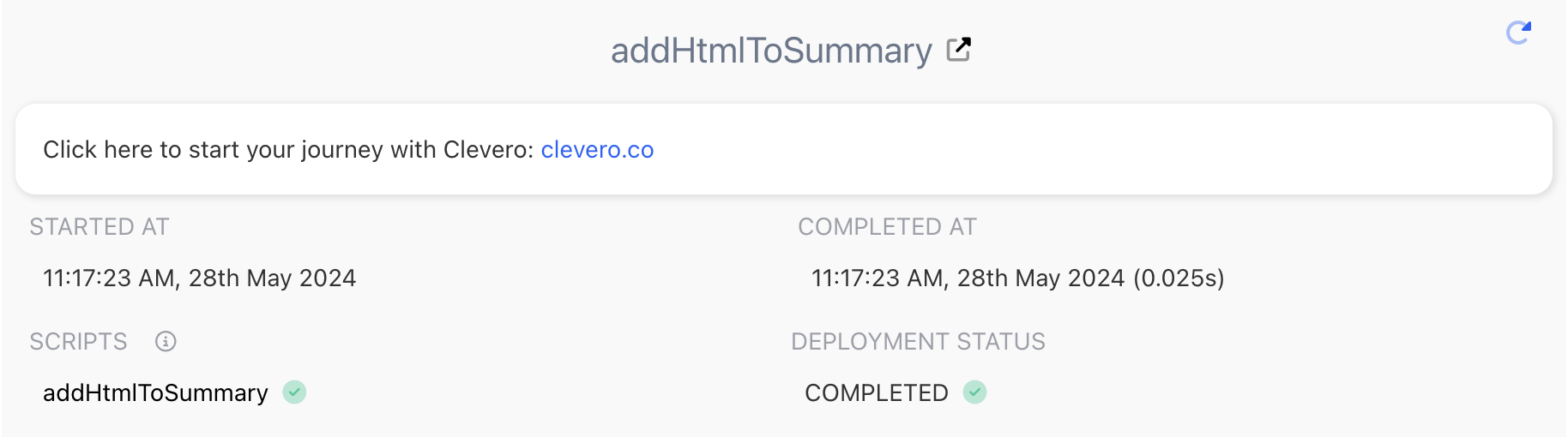
addHtmlToSummary
Adds HTML code to the summary. This is really useful if you need want to show a more professional display back to the end user.
| Input Parameters | Returns |
|---|---|
| HTML code. | HTML in the summary. |
Example
C.addHtmlToSummary(
    "Click here to start your journey with Clevero: <a href='https://clevero.co'>clevero.co</a>"
);
Output
addJsonToSummary
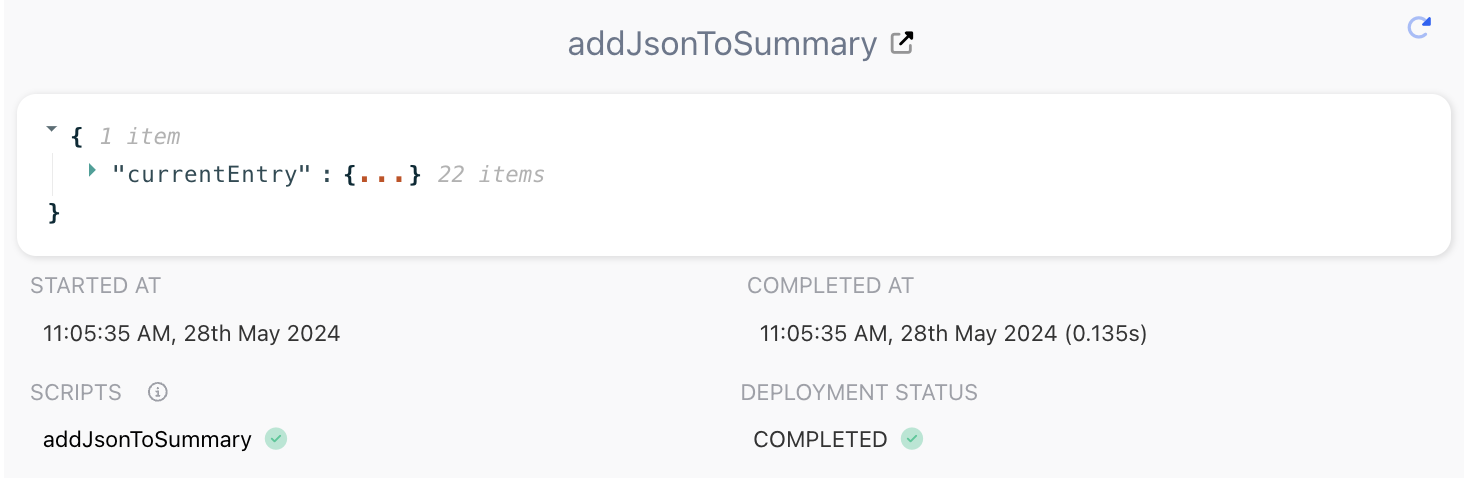
Adds a JSON object to the summary.
| Input Parameters | Returns |
|---|---|
| JSON data in the summary. |
Example
const currentEntry = await C.getCurrentEntry();
C.addJsonToSummary({ currentEntry: currentEntry });
Output
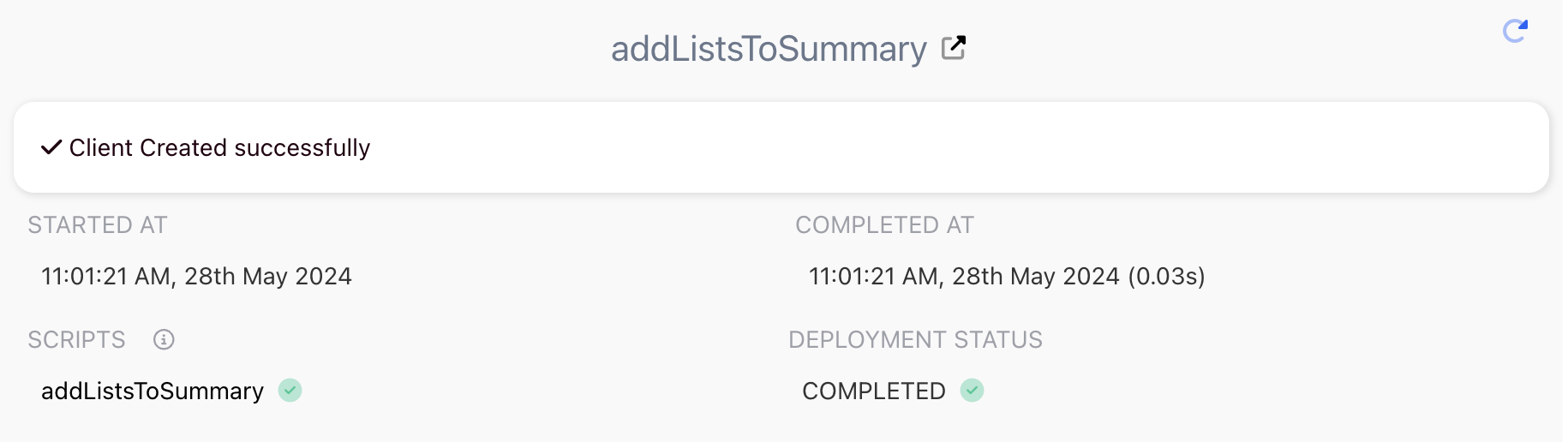
addListsToSummary
Adds an array of items to the summary.
| Input Parameters | Returns |
|---|---|
An array of items:
| A list in the summary. |
Example
C.addListsToSummary(
    [
        {
           value: "Client Created successfully",
           valueColor: "#220010",
           iconColor: "#220010",
           icon: "fa-duotone fa-check"
         },
    ]
);
Output
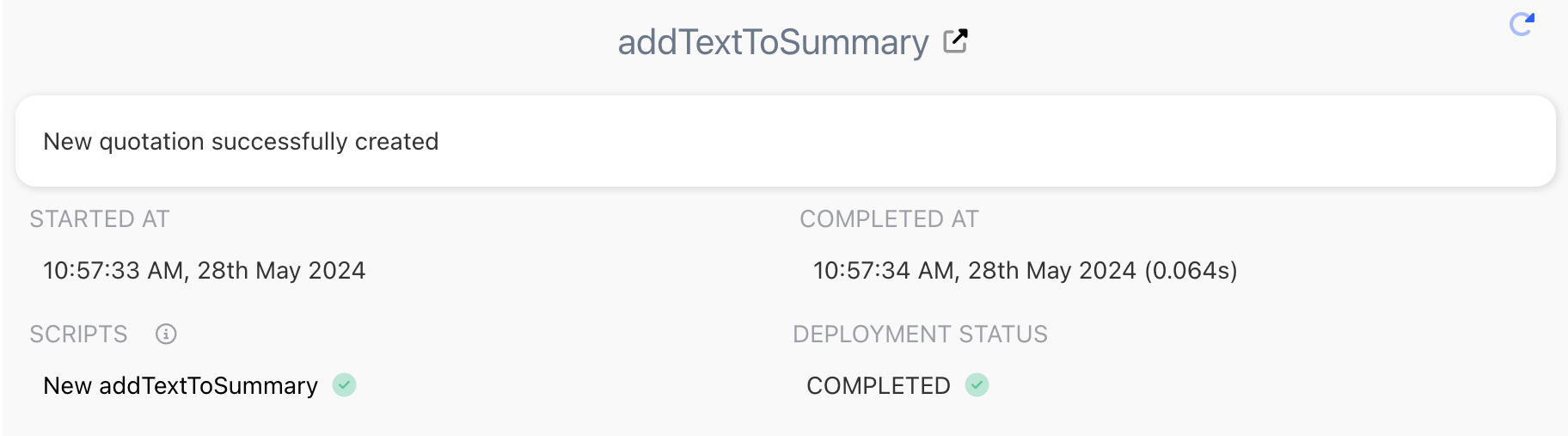
addTextToSummary
Adds text to the summary.
| Input Parameters | Returns |
|---|---|
| Text. | Text in the summary. |
Example
C.addTextToSummary("New quotation successfully created");Output
Payments
These function relate to payment gateways like Pin Payments and Zai. Whether you're taking a charge or providing a refund, these functions will help.
createCharge
Creates a payment charge on a credit card through Pin Payments.
| Input Parameters | Returns |
|---|---|
| Information related to the payment transaction. |
Example
C.createCharge({
        cardInfo: {
            number: "5520000000000000",
            expiry_month: "11",
            expiry_year: "2023",
            cvc: "123",
            name: "test",
            address_line1: "ad1",
            address_city: "ad2",
            address_postcode: "123",
            address_country: "Australia",
            address_line2: "ad2",
            address_state: "st1",
        },

        // cardToken: cardToken.cardResponse.token,
        // customerToken: "customer_token",

        amount: 200,
        description: "test charge",
        email: "[email protected]",
        options: {
            testOrLive: "test",
            addSurcharge: true,
            surchargePricing: {
                domestic: { percent: 0.2, constantAmount: 1.6 },
            },
        },
    });
Output
{
  "result": {
    "chargeToken": "ch_aosPtFzn5v8HfC8b12jdUA",
    "chargeEntry": {
      "fieldValues": {
        "10526": "ch_aosPtFzn5v8HfC8b12jdUA",
        "10527": "10000",
        "10528": "AUD",
        "10529": "test charge",
        "10530": "[email protected]",
        "10531": "",
        "10532": "[\"304705805\"]",
        "10533": "2026-08-11T02:25:16Z",
        "10534": "true",
        "10535": "205",
        "10536": "9795",
        "10537": "0",
        "10538": "false",
        "10539": "false",
        "10540": "false",
        "10541": "true",
        "10542": "2026-08-11T02:25:16Z",
        "10543": "AUD",
        "10544": "false",
        "10545": "{}"
      },
      "recordValueId": 304705807,
      "recordId": 259489,
      "owner": 10032596,
      "formId": 259490,
      "source": "INTERNAL",
      "autoId": null,
      "createdAt": "2026-08-11T02:25:17.239Z",
      "updatedAt": "2026-08-11T02:25:17.239Z"
    },
    "chargeResponse": {
      "token": "ch_aosPtFzn5v8HfC8b12jdUA",
      "success": true,
      "amount": 10000,
      "currency": "AUD",
      "description": "test charge",
      "email": "[email protected]",
      "ip_address": null,
      "created_at": "2026-08-11T02:25:16Z",
      "status_message": "Success",
      "error_message": null,
      "card": {
        "token": "card_oH04fpqJcGTUIWOP8qU3OA",
        "scheme": "visa",
        "display_number": "XXXX-XXXX-XXXX-0000",
        "issuing_country": "AU",
        "expiry_month": 11,
        "expiry_year": 2027,
        "name": "Test User",
        "address_line1": "ad1",
        "address_line2": "ad2",
        "address_city": "ad2",
        "address_postcode": "123",
        "address_state": "st1",
        "address_country": "Australia",
        "customer_token": null,
        "primary": null,
        "network_type": null,
        "network_format": null
      },
      "transfer": [],
      "amount_refunded": 0,
      "total_fees": 205,
      "merchant_entitlement": 9795,
      "refund_pending": false,
      "authorisation_token": null,
      "authorisation_expired": false,
      "authorisation_voided": false,
      "captured": true,
      "captured_at": "2026-08-11T02:25:16Z",
      "settlement_currency": "AUD",
      "active_chargebacks": false,
      "metadata": {},
      "platform_fees": 0,
      "platform_adjustment": {
        "amount": 0,
        "currency": "AUD"
      }
    },
    "isChargeSaved": true
  }
}
createZaiCharge
Creates a payment charge on a credit card through Zai Payments.
| Input Parameters | Returns |
|---|---|
data: An object that holds essential information like the charge's name, amount, currency, and user-related information. | Zai charge in JSON payload. |
Example
await C.createZaiCharge({
        data: {
            name: "Charge from workflow",
            account_id: "0ac944f0-e32c-013b-725d-0a58a9feac03",
            amount: 4200,
            email: "[email protected]",
            zip: 3000,
            country: "AUS",
            currency: "AUD",
            user_id: "demo-user",
            custom_descriptor: "229",
        },
});
refundZaiCharge
Process a refund through Zai Payments.
| Input Parameters | Returns |
|---|---|
| Refund details in JSON payload. |
Example
C.refundZaiCharge({
        itemId: "aeb114f9-bb86-4702-984d-f518df52d4d0",
				params: { // Optional
        		refundAmount: 1050;
        		refundMessage: "Your booking for course: C122 has been cancelled. Amount $10.50 has been refunded";
        		accountId: "0ac944f0-e32c-013b-725d-0a58a9feac03";
    		}
});
Portals
Our portal functions assist in providing, restricting or removing access to Portals quickly and easily.
createPortalUser
Creates a portal user.
| Input Parameters | Returns |
|---|---|
| New portal user details. |
Info:If the portal configures the same record for datascope and contact, both
dataScopeEntryIdandportalContactIdcan use the same entry ID.
Example
const payload1 = {
        email: email1,
        portalContactId: 1185813,
        portalRoleId: 1185799,
        dataScopeEntryId: 25254,
        portalIdentifier: "portal-1",
    };
const response = await C.createPortalUser(payload1);
Output
{
  "createdPortalEmployee": true,
  "createdNewInternalUser": true,
  "portalRoleDefaultEmailSent": true,
  "createdNewAuth0User": true
}
disablePortalAccess
Disables the user's portal access.
| Input Parameters | Returns |
|---|---|
portalUserIds: An array containing the IDs of the portal users for whom access will be disabled. | Any string. |
Example
C.disablePortalAccess({
  portalUserIds: []
});
Output
{
  "success": [
    {
      "index": 0,
      "updateObject": {
        "entryId": 10045078,
        "recordInternalId": "portal-employees",
        "valuesType": "iov",
        "value": {
          "allow-login": false
        }
      },
      "recordId": 131942
    }
  ]
}
enablePortalAccess
Enables the user's portal access.
| Input Parameters | Returns |
|---|---|
portalUserIds: An array containing the IDs of the portal users for whom access will be enabled. | Any string. |
Example
C.enablePortalAccess({
  portalUserIds: []
});
Output
{
  "success": [
    {
      "index": 0,
      "updateObject": {
        "entryId": 10045078,
        "recordInternalId": "portal-employees",
        "valuesType": "iov",
        "value": {
          "allow-login": true
        }
      },
      "recordId": 131942
    }
  ]
}
removePortalAccess
Deletes the portal access.
| Input Parameters | Returns |
|---|---|
portalUserIds: An array of portal-employee IDs. | Removal status. |
Example
C.removePortalAccess({
  portalUserIds: [],
})
Output
{
  "before": {
    "portal-parent": "100000010",
    "portal-contact": "100150293",
    "email": "[email protected]",
    "roles": [
      663733
    ],
    "allow-login": true,
    "recordValueId": 10045109,
    "createdAt": "2026-07-27T05:48:08.456Z",
    "updatedAt": "2026-07-27T05:48:08.456Z",
    "autoId": "44",
    "autoIdNum": 44,
    "internalOwner": 131,
    "formId": 131943,
    "recordId": 131942
  },
  "message": "Successful - removed portal access for 1 record(s): 10045109"
}
updatePortalAccess
Updates the portal access.
| Input Parameters | Returns |
|---|---|
| Update status. |
Example
C.updatePortalAccess({
  portalUserIds: [],
  type: "enable"
})
InfoPortal access can be managed directly from the portal user record. This action is not currently supported through workflow functions.
Record
These functions relate specifically to records. Here you'll find functions to create entries, update entry data, delete entries and many other useful functions.
createEntries
Creates one or more entries for a record.
| Input Parameters | Returns |
|---|---|
| Entry details. |
Example
await C.createEntries({
    recordInternalId: 'customers',
    values: [
        {
            firstName: 'test',
            lastName: 'clevero',
            email: '[email protected]',
            phone: '123-456-7890'
        },
        {
            firstName: 'demo',
            lastName: 'clevero',
            email: '[email protected]',
            phone: '987-654-3210'
        }
    ]
});
Output
{
  "failed": [],
  "success": [
    {
      "index": 0,
      "id": 10046295,
      "value": {
        "358": "123-456-7890",
        "402": "[email protected]"
      },
      "formId": 340,
      "employeeId": 10045956,
      "owner": 10045925,
      "recordId": 130,
      "recordInternalId": "customers"
    },
    {
      "index": 1,
      "id": 10046296,
      "value": {
        "358": "987-654-3210",
        "402": "[email protected]"
      },
      "formId": 340,
      "employeeId": 10045956,
      "owner": 10045925,
      "recordId": 130,
      "recordInternalId": "customers"
    }
  ]
}
createEntry
Creates a single entry for a record.
| Input Parameters | Returns |
|---|---|
| An object containing the result of the operation, including success and failure arrays with entry details. |
Example
await C.createEntry({
  recordInternalId: 'customers',
  value: {
    firstName: 'Jane',
    lastName: 'Doe',
    email: '[email protected]',
    phone: '555-123-4567'
  }
});
Output
{
  "failed": [],
  "success": [
    {
      "index": 0,
      "id": 987654321,
      "value": {
        "firstName": "Jane",
        "lastName": "Doe",
        "email": "[email protected]",
        "phone": "555-123-4567"
      },
      "formId": 0,
      "owner": 20040022,
      "recordId": 4005678,
      "recordInternalId": "customers"
    }
  ]
}success: Contains entries that were successfully created.failed: Contains entries that failed to be created (empty if none).
deleteEntries
This will delete entries from the system. Use with caution.
| Input Parameters | Returns |
|---|---|
| Any string. |
Example
C.deleteEntries({
        deletes: [
            {
                entryIds: [562940, 556889],
                recordInternalId: 'backlog-items',
            },
        ],
    });
Output
{
  "success": [
    {
      "entryId": 100150064,
      "recordInternalId": "backlog-items",
      "recordId": 233450,
      "owner": 131
    },
    {
      "entryId": 100150065,
      "recordInternalId": "backlog-items",
      "recordId": 233450,
      "owner": 131
    }
  ]
}
getCurrentEntry
Gets the current entry. To be used with real time scripts only.
| Input Parameters | Returns |
|---|---|
| - | currentEntry. |
Example
let currentEntry = await C.getCurrentEntry();
C.addJsonToSummary(currentEntry);
Output
{
  "project-number": "<project number>",
  "title": "<title of the project>",
  "customer": [
    304558551
  ],
  "10045925-multiselect-field": [
    10045932,
    10045956
  ],
  "start-date": "2026-07-15",
  "project-manager-notified": false,
  "status": [
    2430652
  ],
  "recordValueId": 304561381,
  "createdAt": "2026-07-15T04:32:31.518Z",
  "updatedAt": "2026-07-17T01:59:49.393Z",
  "createdBy": 10045956,
  "updatedBy": 10045956,
  "autoId": "2",
  "autoIdNum": 2,
  "internalOwner": 10045925,
  "formId": -1,
  "recordId": 2425689
}
getCurrentEntryAssociations
Gets association data for the current entry. Only available for Real Time Scripts. E.g get all Invoices on a Customer.
| Input Parameters | Returns |
|---|---|
associationsId: Associations ID. | Associations data. |
Example
let customerInvoices = await C.getCurrentEntryAssociations("invoices");
C.addJsonToSummary(customerInvoices)
Output
{
  "invoices": [
    {
      "status": [
        34129
      ],
      "project": [
        304567544
      ],
      "xero-id": null,
      "customer": [
        304558551
      ],
      "due-date": "2026-07-31",
      "reference": "1234134",
      "email-sent": false,
      "amount-paid": 0,
      "date-issued": "2026-07-17",
      "invoice-number": null,
      "amount-credited": 0,
      "amount-remaining": 0,
      "xero-invoice-link": null,
      "recordValueId": 304578297,
      "createdAt": "2026-07-20T02:23:55.345Z",
      "updatedAt": "2026-07-20T04:06:39.810Z",
      "autoId": "2",
      "autoIdNum": 2,
      "internalOwner": 10045925,
      "formId": -1,
      "recordId": 1719816,
      "createdBy": 10045956,
      "updatedBy": 10045956
    }
  ]
}
getCurrentEntrySubrecords
Gets subrecords data for the current entry.
| Input Parameters | Returns |
|---|---|
subrecordsId: Subrecord ID. | Subrecords data. |
Example
C.getCurrentEntrySubrecords("clevero-dependencies")Output
{
  "xero-order-items": [
    {
      "__section-title": null,
      "__type": null,
      "parent": "304572906",
      "index": 0,
      "tax": 0,
      "rate": 100,
      "quantity": 3,
      "net": 300,
      "total": 300,
      "tax-rate": [],
      "account": [],
      "item": [
        304572757
      ],
      "tracking-options-1": [],
      "tracking-options-2": [],
      "recordValueId": 304572907,
      "createdAt": "2026-07-17T04:57:23.549Z",
      "updatedAt": "2026-07-17T06:02:13.545Z",
      "createdBy": 10045956,
      "updatedBy": 10045956,
      "autoId": "1",
      "autoIdNum": 1,
      "internalOwner": 10045925,
      "formId": -1,
      "recordId": 463883
    },
    {
      "__section-title": null,
      "__type": null,
      "parent": "304572906",
      "index": 1,
      "tax": 0,
      "rate": 234,
      "quantity": 4,
      "net": 936,
      "total": 936,
      "tax-rate": [],
      "account": [],
      "item": [
        304572879
      ],
      "tracking-options-1": [],
      "tracking-options-2": [],
      "recordValueId": 304572908,
      "createdAt": "2026-07-17T04:57:23.549Z",
      "updatedAt": "2026-07-17T06:02:13.543Z",
      "createdBy": 10045956,
      "updatedBy": 10045956,
      "autoId": "2",
      "autoIdNum": 2,
      "internalOwner": 10045925,
      "formId": -1,
      "recordId": 463883
    },
    {
      "__section-title": null,
      "__type": null,
      "parent": "304572906",
      "index": 2,
      "tax": 0,
      "rate": 940,
      "quantity": 7,
      "net": 6580,
      "total": 6580,
      "tax-rate": [],
      "account": [],
      "item": [
        304572880
      ],
      "tracking-options-1": [],
      "tracking-options-2": [],
      "recordValueId": 304572909,
      "createdAt": "2026-07-17T04:57:23.549Z",
      "updatedAt": "2026-07-17T06:02:13.542Z",
      "createdBy": 10045956,
      "updatedBy": 10045956,
      "autoId": "3",
      "autoIdNum": 3,
      "internalOwner": 10045925,
      "formId": -1,
      "recordId": 463883
    }
  ]
}
getEntry
Gets an entry by its ID. Useful when you want to retrieve a specific entry where you know the record and id of the entry.
| Input Parameters | Returns |
|---|---|
| Any string. |
Example
async function script(C) {
    try {
        const result = await C.getEntry({
            entryIds: 760176,
            recordInternalId: "organisations",
        });
        C.log("Fetched Entry:", result);

        C.addJsonToSummary(result, { enableCopy: true });

        return {
            result,
        };
    } catch (error) {
        C.error("Error fetching entry:", error);
    }
}
Output
[
  {
    "name": "Company Name – Location",
    "date-added": "2022-08-29T03:20:20.739Z",
    "stage": [
      465013
    ],
    "lead-source": [
      589984
    ],
    "main-email": "[email protected]",
    "status": [
      579263
    ],
    "type": [
      92912
    ],
    "first-name": "test",
    "last-name": "clevero",
    "currency": [
      589861
    ],
    "sales-rep": [
      590528
    ],
    "xero-id": "e486459c-7485-44b1-97f2-015202cfa664",
    "xero-updated-date-utc": "2022-08-24T15:12:45.000Z",
    "total-invoiced": 1669.8,
    "recordValueId": 760176,
    "createdAt": "2022-08-24T09:03:17.404Z",
    "updatedAt": "2024-07-29T10:57:50.724Z",
    "autoId": "58",
    "autoIdNum": 58,
    "internalOwner": 463874,
    "formId": 558944,
    "recordId": 464166
  }
]
getEntries
Will retrieve multiple entries based on ids passed in.
| Input Parameters | Returns |
|---|---|
| An array of entries. |
Example
async function script(C) {
    const result = await C.getEntries({
        entryIds: [760176, 1342638],
        recordInternalId: 'organisations',
    });

    C.addJsonToSummary(result, { enableCopy: true });

    return {
        result
    };
}
Output
[
  {
    "name": "Sample Company - Perth",
    "date-added": "2022-08-29T03:20:20.739Z",
    "stage": [
      465013
    ],
    "lead-source": [
      589984
    ],
    "main-email": "[email protected]",
    "status": [
      579263
    ],
    "type": [
      92912
    ],
    "first-name": "test",
    "last-name": "clevero",
    "currency": [
      589861
    ],
    "sales-rep": [
      590528
    ],
    "xero-id": "e486459c-7485-44b1-97f2-015202cfa664",
    "xero-updated-date-utc": "2022-08-24T15:12:45.000Z",
    "total-invoiced": 1669.8,
    "recordValueId": 760176,
    "createdAt": "2022-08-24T09:03:17.404Z",
    "updatedAt": "2024-07-29T10:57:50.724Z",
    "autoId": "58",
    "autoIdNum": 58,
    "internalOwner": 463874,
    "formId": 558944,
    "recordId": 464166
  },
  {
    "name": "Sample Company - Brisbane",
    "date-added": "2024-08-29T06:58:55.880Z",
    "stage": [
      465012
    ],
    "lead-source": [
      589985
    ],
    "status": [
      579254
    ],
    "type": [
      92912
    ],
    "parent": [
      593962
    ],
    "sales-rep": [
      764269
    ],
    "logo": null,
    "total-invoiced": 98,
    "primary-contact": [
      764456
    ],
    "client-name": "John Doe",
    "recordValueId": 1342638,
    "createdAt": "2023-01-15T05:08:54.967Z",
    "updatedAt": "2024-08-29T06:58:56.252Z",
    "autoId": "59",
    "autoIdNum": 59,
    "internalOwner": 463874,
    "formId": 558944,
    "recordId": 464166
  }
]
updateEntries
Updates entries.
| Input Parameters | Returns |
|---|---|
| Returns a string containing the ID of the updated entry. |
Example
async function script(C) {
    const currentEntry = await C.getCurrentEntry();

    await C.updateEntries({
        updates: [
            {
                value: { "date-added": C.moment().toISOString() },
                recordInternalId: "leads",
                entryId: currentEntry.recordValueId,
            },
        ],
    });

    C.addJsonToSummary(currentEntry, { enableCopy: true });

    // Return the current entry
    return currentEntry;
}
Output
{
  "date-added": "2024-09-06T09:50:41.880Z",
  "status": [
    578998
  ],
  "enquiry-source": [
    1629571
  ],
  "contact": [
    744408
  ],
  "name": "test clevero",
  "assigned-to": [
    1311762
  ],
  "enquiry-details": "PRD SRS",
  "recordValueId": 200740514,
  "createdAt": "2024-09-06T09:50:41.705Z",
  "updatedAt": "2024-09-06T09:50:41.906Z",
  "autoId": "65",
  "autoIdNum": 65,
  "internalOwner": 463874,
  "formId": 579014,
  "recordId": 578177
}
Search Filters
Our search function allows you to retrieve multiple entries by passing it specific search criteria that is needed.
filterEntries
Filters existing entries and returns the entries that match the specified filter criteria. This function is commonly used in Scheduled Scripts when iterating through multiple entries, such as sending reminder emails for overdue invoices.
| Input Parameters | Returns |
|---|---|
| Array of objects containing entries that match the specified filter criteria. |
NoteThere are no cursor- or offset-based pagination parameters. The
pageSize,offset,skip, andperPageparameters are not supported and are ignored if provided.
NoteIf you filter the entries and there are no matching entries on the selected page, the
entriesarray is empty. In this case,totalMatchedEntriescurrently returns 0.
Example
let invoices = await C.filterEntries({
    filter: [
        {
            subject: "overdue",
            requestType: "i",
            type: "checkbox",
            operator: "is_true"
        },
    ],
    recordInternalId: "invoices",
    limit: 50,
    page: 0,
});

C.addJsonToSummary(invoices);
Output
{
  "entries": [
    {
      "invoice-number": null,
      "reference": "1234134",
      "xero-id": null,
      "amount-paid": 0,
      "amount-remaining": 0,
      "amount-credited": 0,
      "net-total": 11,
      "tax-total": 0,
      "total": 11,
      "customer": [
        304558551
      ],
      "status": [
        34129
      ],
      "project": [
        304567544
      ],
      "date-issued": "2026-07-17",
      "due-date": "2026-07-31",
      "overdue": true,
      "xero-invoice-link": null,
      "recordValueId": 304578297,
      "createdAt": "2026-07-20T02:23:55.345Z",
      "updatedAt": "2026-07-20T23:52:39.796Z",
      "createdBy": 10045956,
      "updatedBy": 10045956,
      "autoId": "2",
      "autoIdNum": 2,
      "internalOwner": 10045925,
      "formId": -1,
      "recordId": 1719816
    }
  ],
  "totalMatchedEntries": 1,
  "totalReturnedEntries": 1
}
Xero and MYOB
If you're looking to build your own custom integration with Xero and MYOB, you can do so using our functions here.
myobGetApiCred
Obtains a valid token to be used with the MYOB API.
Example
async function script(C) {
     // Fetch MYOB API credentials
     const myobCredResponse = await C.myobGetApiCred("<myobClientId>");
}
xeroGet
Retrieves information from Xero for the specified correspondingRecordType.
Valid values for correspondingRecordType include:
accountbrandingThemecontactcreditNotecurrencyinvoiceitemmanualJournalpurchaseOrderpaymenttrackingCategory
| Input Parameters | Returns |
|---|---|
| xeroGet |
Example
C.xeroGet({
        xeroTenantId: tenantId,
        correspondingRecordType: "invoice",
});
Output
{
  "match": {
    "type": "ACCREC",
    "contact": {
      "contactID": "68ad84fa-a763-49f6-aaca-9edc47c35fd0",
      "name": "Mark",
      "contactPersons": [],
      "addresses": [],
      "phones": [],
      "contactGroups": [],
      "hasValidationErrors": false
    },
    "lineItems": [
      {
        "lineItemID": "b0d972ed-972f-44be-9545-a0e807f9c6a7",
        "tracking": []
      }
    ],
    "date": "2025-08-27T00:00:00.000Z",
    "dueDate": "2025-09-10T00:00:00.000Z",
    "lineAmountTypes": "Exclusive",
    "invoiceNumber": "INV-0022259",
    "reference": "Invoice",
    "brandingThemeID": "b9065c22-e4ef-4f20-92fb-d46347e13e85",
    "currencyCode": "AUD",
    "currencyRate": 1,
    "status": "",
    "subTotal": 0,
    "totalTax": 0,
    "total": 0,
    "invoiceID": "d1c51368-0b2c-4999-8559-0e2440ef0b3a",
    "hasAttachments": false,
    "isDiscounted": false,
    "payments": [],
    "prepayments": [],
    "overpayments": [],
    "amountDue": 0,
    "amountPaid": 0,
    "amountCredited": 0,
    "updatedDateUTC": "2025-08-28T00:26:46.390Z",
    "creditNotes": [],
    "hasErrors": false
  }
}
xeroUpsert
Creates or updates data in Xero.
Valid values for correspondingRecordType include:
invoiceitembillcontactpurchaseOrderpaymentcreditNotetrackingOptiontrackingCategorypayrollEmployeepayrollTimesheetmanualJournal
| Input Parameters | Returns |
|---|---|
| xeroClient |
Example
C.xeroUpsert({
        recordId: 591600,
        entryId: 698937,
        xeroTenantId: tenantId,
        correspondingRecordType: "item",
        xeroEntryData: data,
});
Output
{
  "result": {
    "response": {
      "statusCode": 200,
      "body": {
        "Id": "49ebabc8-238d-4fad-926a-2230e0307c1f",
        "Status": "OK",
        "ProviderName": "Clevero",
        "DateTimeUTC": "/Date(1785289474261)/",
        "Invoices": [
          {
            "Type": "ACCREC",
            "InvoiceID": "1849ae13-3c6b-47eb-86ae-63c21b9bd6fb",
            "InvoiceNumber": "INV-0056",
            "Reference": "072926",
            "Prepayments": [],
            "Overpayments": [],
            "AmountDue": 0,
            "AmountPaid": 0,
            "SentToContact": false,
            "CurrencyRate": 1,
            "IsDiscounted": false,
            "HasErrors": false,
            "InvoicePaymentServices": [],
            "UpdatedDateUTCString": "2026-07-29T01:44:34Z",
            "Contact": {},
            "DateString": "2026-07-29T00:00:00",
            "Date": "/Date(1785283200000+0000)/",
            "DueDateString": "2026-07-31T00:00:00",
            "DueDate": "/Date(1785456000000+0000)/",
            "BrandingThemeID": "01c61535-7cd5-498e-be87-e921235e951c",
            "Status": "DRAFT",
            "LineAmountTypes": "Exclusive",
            "LineItems": [
              {
                "Tracking": [],
                "LineItemID": "b777f267-5c6b-419e-9827-2a24f810026c",
                "ValidationErrors": []
              }
            ],
            "SubTotal": 0,
            "TotalTax": 0,
            "Total": 0,
            "UpdatedDateUTC": "/Date(1785289474223+0000)/",
            "CurrencyCode": "AUD"
          }
        ]
      },
      "headers": {
        "content-type": "application/json; charset=utf-8",
        "content-length": "2952",
        "xero-correlation-id": "49ebabc8-238d-4fad-926a-2230e0307c1f",
        "x-appminlimit-remaining": "9987",
        "x-minlimit-remaining": "55",
        "x-daylimit-remaining": "4974",
        "xero-tenant-id": "40581019-bc88-4736-9ca0-088080d7890a",
        "server": "tpzgw-c",
        "expires": "Wed, 29 Jul 2026 01:44:34 GMT",
        "cache-control": "max-age=0, no-cache, no-store",
        "pragma": "no-cache",
        "date": "Wed, 29 Jul 2026 01:44:34 GMT",
        "connection": "close",
        "x-client-tls-ver": "tls1.3"
      },
      "request": {
        "uri": {
          "protocol": "https:",
          "slashes": true,
          "auth": null,
          "host": "api.xero.com",
          "port": 443,
          "hostname": "api.xero.com",
          "hash": null,
          "search": null,
          "query": null,
          "pathname": "/api.xro/2.0/Invoices",
          "path": "/api.xro/2.0/Invoices",
          "href": "https://api.xero.com/api.xro/2.0/Invoices"
        },
        "method": "POST",
        "headers": {
          "user-agent": "xero-node-4.32.0",
          "xero-tenant-id": "40581019-bc88-4736-9ca0-088080d7890a",
          "Authorization": "[REDACTED]",
          "accept": "application/json",
          "content-type": "application/json",
          "content-length": 111
        }
      }
    },
    "body": {
      "invoices": [
        {
          "type": "ACCREC",
          "contact": {
            "contactID": "834fc172-df54-48cc-befd-25ce829e7b47",
            "contactStatus": "ACTIVE",
            "name": "CUSTOMER",
            "emailAddress": "[email protected]",
            "contactPersons": [],
            "bankAccountDetails": "",
            "addresses": [
              {
                "addressType": "STREET",
                "city": "",
                "region": "",
                "postalCode": "",
                "country": ""
              },
              {
                "addressType": "POBOX",
                "city": "",
                "region": "",
                "postalCode": "",
                "country": ""
              }
            ],
            "phones": [
              {
                "phoneType": "DEFAULT",
                "phoneNumber": "",
                "phoneAreaCode": "",
                "phoneCountryCode": ""
              },
              {
                "phoneType": "DDI",
                "phoneNumber": "",
                "phoneAreaCode": "",
                "phoneCountryCode": ""
              },
              {
                "phoneType": "FAX",
                "phoneNumber": "",
                "phoneAreaCode": "",
                "phoneCountryCode": ""
              },
              {
                "phoneType": "MOBILE",
                "phoneNumber": "",
                "phoneAreaCode": "",
                "phoneCountryCode": ""
              }
            ],
            "isSupplier": false,
            "isCustomer": true,
            "salesTrackingCategories": [],
            "purchasesTrackingCategories": [],
            "updatedDateUTC": "2026-07-29T01:29:10.577Z",
            "contactGroups": [],
            "hasValidationErrors": false
          },
          "lineItems": [
            {
              "lineItemID": "b777f267-5c6b-419e-9827-2a24f810026c",
              "tracking": []
            }
          ],
          "date": "2026-07-29T00:00:00.000Z",
          "dueDate": "2026-07-31T00:00:00.000Z",
          "lineAmountTypes": "Exclusive",
          "invoiceNumber": "INV-0056",
          "reference": "072926",
          "brandingThemeID": "01c61535-7cd5-498e-be87-e921235e951c",
          "currencyCode": "AUD",
          "currencyRate": 1,
          "status": "DRAFT",
          "sentToContact": false,
          "subTotal": 0,
          "totalTax": 0,
          "total": 0,
          "invoiceID": "1849ae13-3c6b-47eb-86ae-63c21b9bd6fb",
          "isDiscounted": false,
          "prepayments": [],
          "overpayments": [],
          "amountDue": 0,
          "amountPaid": 0,
          "updatedDateUTC": "2026-07-29T01:44:34.223Z",
          "hasErrors": false
        }
      ]
    }
  }
}
xeroUtility
Performs utility operations in Xero, such as sending an invoice by email.
| Input Parameters | Returns |
|---|---|
| tenantId |
Example
C.xeroUtility({
  recordId: 1234, // <-- pass number value here
	entryId: "invoice",
	xeroTenantId: "<YourTenantId>",
	correspondingRecordType: "emailInvoice",
	xeroUtilityData: {
		invoiceID: "<invoiceId>", // Xero's id
	},
});
Output
{
  "action": "emailInvoice",
  "invoiceNumber": "INV-0056",
  "success": true
}
xeroGetToken
Obtains a valid token to be used with the Xero API.
Example
const accessToken = await C.xeroGetToken();
const URL = "https://api.xero.com/api.xro/2.0/Invoices"
const options = {
    headers: {
        Authorization: `Bearer ${accessToken}`,
        "xero-tenant-id": ""
    },
};
// Perform API request
const {data} = await axios.get(URL, options);
C.addJsonToSummary(data)
Output
{
  "hasToken": true,
  "tokenLength": 1816
}{
"invoiceCount": 55
}📌 Need Help?
