
⚙️ Your ultimate interaction functions guide!
Current Event Context
GetCompanySettings
This will obtain company details. Details can include company name, abn, timezone amongst other things.
| Input Parameters | Returns |
|---|---|
| - | Company settings. |
Example
C.getCompanySettings()GetCurrentRole
This function will get the current role of the logged-in user. This is useful if you wish to run logic related to the logged in user. For example, if role is Admin, show specific fields that would normally be hidden from other users.
| Input Parameters | Returns |
|---|---|
| - | Selected role details. |
Example
C.getCurrentRole()GetEvent
The getEvent function is used to provide context of what sort of event is being triggered. In certain circumstances, the field will also be returned.
Event Types
| Event Type | Description |
|---|---|
| MODE_SET | On entry of an Entry Layout. Ie open up an entry. |
| FiELD_FOCUS | The user clicks into a field |
| FORM_UPDATE | A field value on the Entry has been updated |
| FIELD_BLUR | A field has been clicked off from |
| ON_SAVE | The Submit button has been clicked |
| Input Parameters | Returns |
|---|---|
| - | Object |
Example
C.getEvent()GetEventType
This function will return just the eventType value. This is a quick way if you wish to write logic for a specific trigger. For example, ON_SAVE, check key fields, and give the user an alert message if data is missing.
| Input Parameters | Returns |
|---|---|
| - | String |
Example
C.getEventType()GetLoggedInUser
Get the logged-in user.
| Input Parameters | Returns |
|---|---|
| - | User details who logged in. |
Example
const loggedInUser = C.getLoggedInUser();
console.log(loggedInUser);
/*
{
    "id": 258365,
    "email": "[email protected]",
    "firstName": "Demo",
    "lastName": "Employee",
    "createdAt": "2021-12-08T01:38:16.573Z",
    "requiresPasswordReset": false,
    "requiresTermsAndConditionsAgreement": false
}
*/
GetMode
Return the current mode of the entry layout.
| Input Parameters | Returns |
|---|---|
| - | Mode values, like "view" or "edit. |
Example
const mode = C.getMode();
console.log(mode);
// view || edit || add
IsAddMode
Assesses whether the EL is in Add mode. Return true if the current mode is added.
| Input Parameters | Returns |
|---|---|
| - | Boolean values (true or false). |
Example
C.isAddMode()IsEditMode
Assesses whether the EL is in Edit mode. Return true if the current mode is edited.
| Input Parameters | Returns |
|---|---|
| - | Boolean values (true or false). |
Example
C.isEditMode()IsTouched
Return whether any field's value/form is touched.
| Input Parameters | Returns |
|---|---|
| - | Boolean values (true or false). |
Example
C.isTouched()IsValid
Return whether all field values/forms are valid.
| Input Parameters | Returns |
|---|---|
| - | Boolean values (true or false). |
Example
C.isValid()IsViewMode
Return true if the current mode is a view.
| Input Parameters | Returns |
|---|---|
| - | Boolean values (true or false). |
Example
C.isViewMode()Fields
GetFieldDescription
All fields have optional descriptions that can be entered. GetFieldDescription will obtain that description. This can be handy if wanting these details to be put into emails or other communications.
| Input Parameters | Returns |
|---|---|
fieldInternalId: Internal Id of the field to get the value from. | Description of the field. |
Example
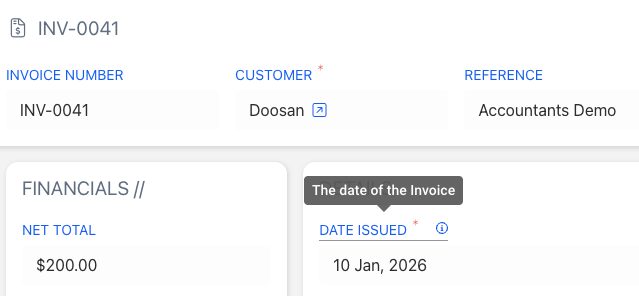
In the scenario above,
let description = C.getFieldDescription("date-issued");
console.log(description);
// The date of the Invoice
GetFieldMeta
Return the field’s meta from the current state. For example, this will return whether the field is mandatory, disable, etc. It returns key information about that specific field.
| Input Parameters | Returns |
|---|---|
fieldInternalId: Internal Id of the field to get the value from. | Meta of field. |
Example
let fieldMeta = C.getFieldMeta("customer");
console.log(fieldMeta);
/*
{
    "readonly": false,
    "noValueText": "",
    "placeholder": null,
    "description": null,
    "disableAdd": "",
    "labelOptions": {
        "hide": "",
        "orientation": "top",
        "icon": "",
        "iconColor": "default",
        "color": "primary",
        "weight": ""
    },
    "label": "Customer",
    "type": "select",
    "mandatory": true,
    "disabled": false,
    "hidden": false,
    "error": false,
    "field": {
        "id": 20862,
        "name": "Customer",
        "internalId": "customer",
        "settings": {
            "options": {
                "field": 18246,
                "order": 1,
                "record": 1819867,
                "colorFieldId": "",
                "orderFieldId": 18246
            },
            "mandatory": true,
            "description": "",
            "placeholder": "",
            "displayField": false,
            "displayOnParent": true
        },
        "custom": false,
        "owner": 131,
        "fieldType": {
            "id": 315,
            "name": "Select",
            "internalId": "select"
        }
    },
    "isTouched": false,
    "isValidating": false
}
*/
GetFieldNoValueText
All fields have a "No Value Text" that can be set. This is text shown in the field when there is no value found.
Use this to return the field’s no-value text.
| Input Parameters | Returns |
|---|---|
fieldInternalId: Internal Id of the field to get the value from. | Field with no value text. |
Example
let noValueText = C.getFieldNoValueText("customer");
console.log(noValueText); // No Customer Set
GetFieldOwner
This will return the field’s owner. This will be id of the Clevero Instance that owns that field.
| Input Parameters | Returns |
|---|---|
fieldInternalId: Internal Id of the field to get the value from. | Owner's id. |
Example
C.getFieldOwner("first-name")GetFieldPlaceholder
All fields can have a "Placeholder" text set. This will return what that placeholder text is
| Input Parameters | Returns |
|---|---|
fieldInternalId: Internal Id of the field to get the value from. | Field's placeholder. |
Example
C.getFieldPlaceholder("first-name")GetFieldSelectOptionConfig
Return the options object from the field’s settings. This is for fields like select, multi-select, multichoice, radio, etc., whose fields have settings objects.
| Input Parameters | Returns |
|---|---|
fieldInternalId: Internal Id of the field to get the value from. | Select the field's options. |
Example
const selectConfig = C.getFieldSelectOptionConfig("customer");
console.log(selectConfig);
/*
{
    "field": 18246,
    "order": 1,
    "record": 1819867,
    "colorFieldId": "",
    "orderFieldId": 18246
}
*/
GetFieldSettings
Return the field’s settings.
| Input Parameters | Returns |
|---|---|
fieldInternalId: Internal Id of the field to get the value from. | Field's settings. |
Example
const fieldSettings = C.getFieldSettings("status");
console.log(fieldSettings);
/*
{
    "options": {
        "field": 18246,
        "order": 1,
        "record": 1819867,
        "colorFieldId": "",
        "orderFieldId": 18246
    },
    "mandatory": true,
    "description": "",
    "placeholder": "",
    "displayField": false,
    "displayOnParent": true
}
*/
GetFieldType
This will return the field’s type. ie text, select, etc
| Input Parameters | Returns |
|---|---|
fieldInternalId: Internal Id of the field to get the value from. | String |
Example
const fieldType = C.getFieldType("first-name");
console.log(fieldType);
// text
GetFieldTypeId
Return the field type id.
| Input Parameters | Returns |
|---|---|
fieldInternalId: Internal Id of the field to get the value from. | Field type id. |
Example
const fieldTypeId = C.getFieldTypeId("first-name")GetFilters
Get a filter applied to a field. Filters are applied in select, multi-select, radio, etc.
| Input Parameters | Returns |
|---|---|
fieldInternalId: Internal Id of the field to get the value from. | Any string. |
Example
C.getFilters("scope")const line1 = C.getSubValueBasedOnIndex("xero-order-items", 1);
console.log(line1);
/*
{
"item": [
"2543429"
],
"description": "",
"quantity": 1,
"rate": 0,
"tax-rate": [
"2296478"
],
"net": 0,
"tax": 0,
"total": 0,
"index": 1,
"id": 2628920
}
*/GetValue
Get the current value of the field.
| Input Parameters | Returns |
|---|---|
fieldInternalId: Internal Id of the field to get the value from. | Value of the field. |
Example
const firstName = C.getValue("first-name");
console.log(firstName);
// JohnHideField
This will hides a field from the UI.
| Input Parameters | Returns |
|---|---|
fieldInternalId: Internal Id of the field to get the value from. | fieldMeta: field and hidden detail. |
Example
C.hideField("first-name")C.isEditMode()IsFieldCustom
Checks if the field is custom.
| Input Parameters | Returns |
|---|---|
fieldInternalId: Internal Id of the field to get the value from. | Boolean values (true or false). |
Example
const isCustom = C.isFieldCustom("first-name");
console.log(isCustom);
// trueIsFieldDisabled
Check if the field is disabled.
| Input Parameters | Returns |
|---|---|
fieldInternalId: Internal Id of the field to get the value from. | Boolean values (true or false). |
Example
C.isFieldDisabled("first-name")IsFieldError
Check if the field has an error.
| Input Parameters | Returns |
|---|---|
fieldInternalId: Internal Id of the field to get the value from. | Boolean values (true or false). |
Example
C.isFieldError("first-name")IsFieldHidden
Check if the field is hidden.
| Input Parameters | Returns |
|---|---|
fieldInternalId: Internal Id of the field to get the value from. | Boolean values (true or false). |
Example
C.isFieldHidden("first-name")IsFieldMandatory
Check if the field is mandatory.
| Input Parameters | Returns |
|---|---|
fieldInternalId: Internal Id of the field to get the value from. | Boolean values (true or false). |
Example
C.isFieldMandatory("first-name")IsFieldTouched
Check if the field is touched.
| Input Parameters | Returns |
|---|---|
fieldInternalId: Internal Id of the field to get the value from. | Boolean values (true or false). |
Example
C.isFieldCustom("first-name")IsFieldValidating
Check if the field is currently validating.
| Input Parameters | Returns |
|---|---|
fieldInternalId: Internal Id of the field to get the value from. | Boolean values (true or false). |
Example
C.isFieldValidating("first-name")SetFieldDisabled
Disables the specified field. For example: if status is Approved, disable Approved Date field.
| Input Parameters | Returns |
|---|---|
fieldInternalId: Internal Id of the field to get the value from.value: boolean value (true or false). | fieldMeta: field and disabled detail. |
Example
C.setFieldDisabled("first-name", true)SetFieldError
Sets error to a field. This will trigger the "error" state of a field and display an error message to the user.
| Input Parameters | Returns |
|---|---|
fieldInternalId: Internal Id of the field to get the value from.value: boolean value (true or false). | fieldMeta: field and error detail. |
Example
C.setFieldError("first-name", true)SetFieldErrorText
Sets the error text/message linked to the field.
| Input Parameters | Returns |
|---|---|
fieldInternalId: Internal Id of the field to get the value from.value: text to show when the error occurs. | fieldMeta: field and error text detail. |
Example
C.setFieldErrorText("title", "Must be longer than 3 characters")SetFieldHidden
Sets hidden to the passed value.
| Input Parameters | Returns |
|---|---|
fieldInternalId: Internal Id of the field to get the value from.value: boolean value (true or false). | fieldMeta: field and hidden detail. |
Example
C.setFieldHidden("first-name", true)SetFieldMandatory
Makes the field to be mandatory.
| Input Parameters | Returns |
|---|---|
fieldInternalId: Internal Id of the field to get the value from.value: boolean value (true or false). | fieldMeta: field and mandatory detail. |
Example
C.setFieldMandatory("first-name", true)SetFieldPlaceholder
Sets a placeholder to a field.
| Input Parameters | Returns |
|---|---|
fieldInternalId: Internal Id of the field to get the value from.value: text to show as a placeholder. | fieldMeta: field and placeholder detail. |
Example
C.setFieldPlaceholder("first-name", "Please enter First name")SetFilters
Sets filters to a given field. They are mainly used in select, multi-select, radio, multichoice, etc. This is useful if you wish to filter down a list of options that a user can see.
| Input Parameters | Returns |
|---|---|
fieldInternalId: Internal Id of the field to get the value from.filters: filter object. | fieldMeta |
Example
C.setFilters("type", [{subject: "status", requestType: "i", type:"array", "operator": "any_of", values:[1421, 5313]}])SetValue
Sets the value of a field. This will be one of the most common functions used.
| Input Parameters | Returns |
|---|---|
fieldInternalId: Internal Id of the field to get the value from.value: value from field. | Value from set-request. |
Example
C.setValue("full-name", "New Name")SetFieldLabelOptions
Sets label display options for a specific field. This allows you to customise how the field label appears, such as its color, icon, and orientation.
| Input Parameters | Returns |
|---|---|
| Label with updated options. |
Example
C.setFieldLabelOptions("463874-text", {
color: "#ff0000",
icon: "fa-duotone fa-pencil",
orientation: "bottom"
});ShowField
Shows a field. If a field is in a hidden state, this will show it again.
| Input Parameters | Returns |
|---|---|
fieldInternalId: Internal Id of the field to get the value from. | fieldMeta: field and hidden detail. |
Example
C.showField("first-name")ToggleFieldDisabled
Disable the toggle field.
| Input Parameters | Returns |
|---|---|
fieldInternalId: Internal Id of the field to get the value from. | fieldMeta: field and disabled detail. |
Example
C.toggleFieldDisabled("first-name")ToggleFieldHidden
Toggles field’s visibility property.
| Input Parameters | Returns |
|---|---|
fieldInternalId: Internal Id of the field to get the value from. | fieldMeta: field and hidden detail. |
Example
C.toggleFieldHidden("first-name")ToggleFieldIsValidating
Set toggle’s field is validating.
| Input Parameters | Returns |
|---|---|
fieldInternalId: Internal Id of the field to get the value from. | fieldMeta: field and a boolean value. |
Example
C.toggleFieldIsValidating("first-name")ToggleFieldMandatory
Toggles field’s mandatory value.
| Input Parameters | Returns |
|---|---|
fieldInternalId: Internal Id of the field to get the value from. | fieldMeta: field and mandatory detail. |
Example
C.toggleFieldMandatory("first-name")Subrecords
AddSubValues
C.addSubValues is a function that adds a new line to a table of related items—like adding a new row to a table inside a form. It’s used to keep track of detailed information connected to a main record, such as adding line items to an invoice.
| Input Parameters | Returns |
|---|---|
recordInternalId: Subrecord’s internal id.newValues: array of objects with new values to add. | subValues: sub-values and add detail. |
Example
C.addSubValues("test-record-1", [{tax: 200, raxRate: 20}])GetAllSubValues
GetAllSubValues retrieves every row/line and its corresponding values from a specific subrecord—like getting all lines from an invoice.
| Input Parameters | Returns |
|---|---|
recordInternalId: Subrecord’s internal id. | Array of Objects |
Example
C.getAllSubValues("test-record-1")GetSubValueBasedOnId
Get the value of a specific sub-record at a given id.
| Input Parameters | Returns |
|---|---|
recordInternalId: Subrecord’s internal id.id: id of sub-record line. | Any string. |
Example
C.getSubValueBasedOnId("xero-order-items", "2523")GetSubValueBasedOnIndex
Get the value of a specific sub-record at a given line index.
| Input Parameters | Returns |
|---|---|
recordInternalId: Subrecord’s internal id.index: index. | Any object. |
Example
const line1 = C.getSubValueBasedOnIndex("xero-order-items", 1);
console.log(line1);
/*
{
    "item": [
        "2543429"
    ],
    "description": "",
    "quantity": 1,
    "rate": 0,
    "tax-rate": [
        "2296478"
    ],
    "net": 0,
    "tax": 0,
    "total": 0,
    "index": 1,
    "id": 2628920
}
*/RemoveSubValues
Remove sub-record lines of given IDs. This will delete a line from the sub-record table.
| Input Parameters | Returns |
|---|---|
recordInternalId: Subrecord’s internal id.idsToRemove: array of subline ids to remove. | subValues: sub-values and remove detail. |
Example
C.removeSubValues("test-record-1", [5235, 4623])SetSubRowFiltersBasedOnIndex
Apply filters to fields in the sub-record of specified subline based on its index.
| Input Parameters | Returns |
|---|---|
recordInternalId: Subrecord’s internal id.fieldInternalId: Internal Id of the field to get the value from.index: sub-line index.filters: filter object. | UpdateSubFieldMetaBasedOnIndex |
Example
C.setSubRowFiltersBasedOnIndex("test-record-1", 0, "tax-type", [{subject: "status", requestType: "i", type:"array", "operator": "any_of", values:[1421, 5313]}])SetSubColumnFilters
Apply the filter to all the lines of the sub-record. This will filter down select options in a sub-record. (e.g only show items of type "for-sale")
| Input Parameters | Returns |
|---|---|
recordInternalId: Subrecord’s internal id.fieldInternalId: Internal Id of the field to get the value from.filters: filter object. | UpdateSubMeta |
Example
C.setSubColumnFilters("test-record-1", "tax-type" , [{subject: "status", requestType: "i", type:"array", "operator": "any_of", values:[1421, 5313]}])SetSubRowFilters
Apply filters to fields in the sub-record of specified subline based on its id.
| Input Parameters | Returns |
|---|---|
recordInternalId: Subrecord’s internal id.fieldInternalId: Internal Id of the field to get the value from.subValueId: sub line internal id.filters: filter object. | UpdateSubFieldMetaBasedOnId |
Example
C.setSubRowFilters("test-record-1", 1032, "tax-type", [{subject: "status", requestType: "i", type:"array", "operator": "any_of", values:[1421, 5313]}])SetSubRowFiltersBasedOnId
Apply filters to fields in the sub-record of specified subline based on its id.
| Input Parameters | Returns |
|---|---|
recordInternalId: Subrecord’s internal id.fieldInternalId: Internal Id of the field to get the value from.subValueId: sub line internal id.filters: filter object. | UpdateSubFieldMetaBasedOnIndex |
Example
C.setSubRowFiltersBasedOnId("test-record-1", 5222, "tax-type", [{subject: "status", requestType: "i", type:"array", "operator": "any_of", values:[1421, 5313]}])UpdateSubFieldMeta
Update subFieldMeta of the field from the given id.
| Input Parameters | Returns |
|---|---|
recordInternalId: Subrecord’s internal id.subValueId: id of sub-record line.fieldInternalId: Internal Id of the field to get the value from.updateFieldMetaObj: an object containing updated sub-field meta. | subFieldMeta: subFieldMeta and update detail. |
Example
C.updateSubFieldMeta("test-record-1", 4523, "tax", {hidden: true})UpdateSubFieldMetaBasedOnId
Update subFieldMeta of the field from the given id.
| Input Parameters | Returns |
|---|---|
recordInternalId: Subrecord’s internal id.subValueId: id of sub-record line.fieldInternalId: Internal Id of the field to get the value from.updateFieldMetaObj: an object containing updated sub-field meta. | subFieldMeta: subFieldMeta and update detail. |
Example
C.updateSubFieldMetaBasedOnId("test-record-1", 5221, "tax", {hidden: true})UpdateSubFieldMetaBasedOnIndex
Update subFieldMeta of the field of a given index.
| Input Parameters | Returns |
|---|---|
recordInternalId: Subrecord’s internal id.subValueId: id of sub-record line.fieldInternalId: Internal Id of the field to get the value from.updateFieldMetaObj: an object containing updated sub-field meta. | subFieldMeta: subFieldMeta and update detail. |
Example
C.updateSubFieldMetaBasedOnIndex("test-record-1", 0, "tax", {hidden: true})UpdateSubMeta
Update the sub meta of a given sub-record.
| Input Parameters | Returns |
|---|---|
recordInternalId: Subrecord’s internal id.fieldInternalId: Internal Id of the field to get the value from.updateFieldMetaObj: an object containing updated sub-field meta. | subFieldMeta: subFieldMeta and update detail. |
Example
C.updateSubMeta("test-record-1", "tax", {hidden: true})UpdateSubValue
Update the value of the sub-record line.
| Input Parameters | Returns |
|---|---|
recordInternalId: Subrecord’s internal id.subValueId: id of sub-record line.updateValuesObj: an object containing updated values. | subValues: sub-values and update detail. |
Example
C.updateSubValue("test-record-1", 1512, {tax: 200, taxRate: 20})UpdateSubValueBasedOnId
Update the value of the sub-record line at a given id.
| Input Parameters | Returns |
|---|---|
recordInternalId: Subrecord’s internal id.subValueId: id of sub-record line.updateValuesObj: an object containing updated values. | subValues: sub-values and update detail. |
Example
C.updateSubValueBasedOnId("test-record-1", 2304, {tax: 200, taxRate: 20})UpdateSubValueBasedOnIndex
Update the value of the sub-record line at a given line index.
| Input Parameters | Returns |
|---|---|
recordInternalId: Subrecord’s internal id.index: index.updateValuesObj: an object containing updated values. | fieldMeta: field and error text detail. |
Example
C.updateSubValueBasedOnIndex("test-record-1", 0, {tax: 200, taxRate: 20})Submit
CancelSubmit
CancelSubmit is a function that stops an entry from being submitted when certain conditions aren’t met. It’s triggered when the user clicks the Submit button, but cancels the action if, for example, required fields are missing or the user doesn’t have the authority to submit an invoice for the specified amount.
| Input Parameters | Returns |
|---|---|
| - | meta |
Example
C.cancelSubmit()CanSubmit
CanSubmit will allow you to disable or enable the submit button based on your logic. An example might be, if mandatory fields aren't populated, disable the Submit button until they are populated.
| Input Parameters | Returns |
|---|---|
| - | Boolean values (true or false). |
Example
C.canSubmit()Submit
Trigger Submit on the entry layout. They are used in edit mode to hit save from the interaction function.
| Input Parameters | Returns |
|---|---|
| - | meta |
Example
C.submit()Utility Helpers
ConcatFieldValues
ConcatFieldValues takes a list of field values and combines them into a single string, using a chosen delimiter (like a comma, space, or dash) to separate each value.
| Input Parameters | Returns |
|---|---|
fields: array of field internal ids.separator: character(s) to add between values of fields. | A concatenated string of the fields. |
Example
const fullName = C.concatFieldValues(["first-name", "last-name"], "-") // Harry-StyleshideElement
Hide an element on the Entry Layout (EL).
| Input Parameters | Returns |
|---|---|
elementId | - |
Example
C.hideElement("DDYy1V");setElementHidden
Use this when you want to hide/show an element on the Entry Layout (EL).
| Input Parameters | Returns |
|---|---|
elementId | - |
| Boolean | true = hide element, false = show element. |
Example
C.setElementHidden("fi5ABp", true);toggleElementHidden
Toggle an element's visibility state on the Entry Layout (EL).
| Input Parameters | Returns |
|---|---|
elementId | If the element is currently visible, it becomes hidden. If hidden, it becomes visible. |
Example
C.toggleElementHidden("2X-nzM");MergeAll
At the end of an interaction, if there are multiple actions that need to be performed, use mergeAll to combine multiple actions.
| Input Parameters | Returns |
|---|---|
| - | FormStateFromHandler |
Example
C.mergeAll([
     C.setValue("number", "" + ((+C.getValue("number") || 0) + 1)),
     C.updateSubValueBasedOnId("all-fields-test-1", 571256, {
         number: +firstLine.number + 1 + "",
     }),
     C.addSubValue("all-fields-test-1", {
         name: "heloo 1",
         number: "1",
         "date-field": C.moment().startOf("year").format("YYYY-MM-DD"),
     }),
 ])
Info:For most of the cases, using
mergeAllis recommended when submitting multiple actions.
📌 Need Help?
